Key takeaways:
- All five watches tracked steps and distance accurately, but heart rate accuracy varied.
- The Apple Watch Series 11 was the most accurate heart rate monitor during workouts.
- The Garmin Venu 4's heart rate tracking has more data, ideal for serious training analysis.
- If steps and distance accuracy are your priorities, you don't need an expensive smartwatch.
I never set out to train for a marathon when I began this project. In my mind, I'd committed to a few leisurely jogs, rocking what looked like the entire smartwatch section of Best Buy stacked on my wrists to find out which was the most accurate. I've tested dozens of smartwatches over the years, but never five at once, and never under the level of scrutiny this test demanded. Mile after mile, I pushed my heart rate (and my body) well beyond my comfort zone with the finish line in focus.
Fitness trackers have come a long way since the early Fitbit days of step counting, and in today's wearable landscape, a reliable step counter isn't enough. Smartwatches, rings, fitness bands and even earbuds compete for real estate on your body to monitor everything from heart rate to temperature. To edge out the competition, they must be accurate enough to catch subtle changes in your vitals and turn that data into results.
I tested five models (one at a time), ranging from $80 to $550, to determine which was most accurate for steps, distance and heart rate. Heart rate, in particular, is the most critical (and the hardest to get right) since so many other metrics depend on it.
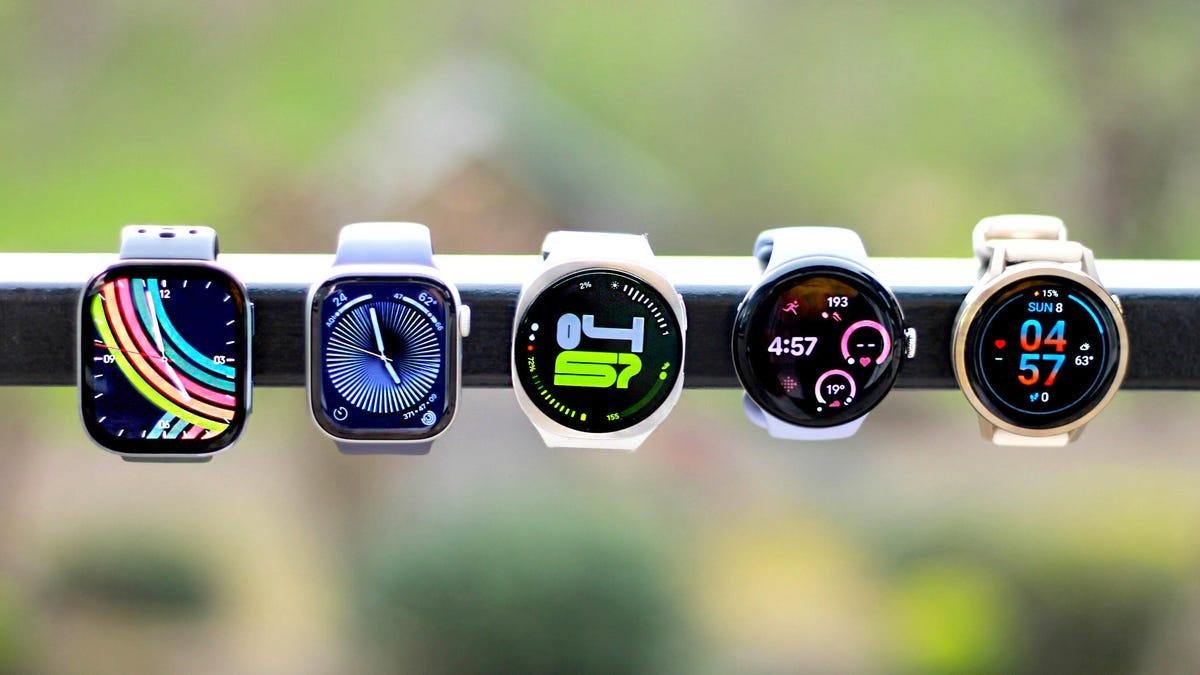
From left to right: Samsung Galaxy Watch 8, Google Pixel Watch 4, Amazfit Bip 6, Garmin Venu 4 and Apple Watch Series 11, alongside the Polar H10 chest strap and tally counter used in our accuracy tests.
Vanessa Hand Orellana/CNETIt's not like I was starting from scratch. I'd already reviewed the Samsung Galaxy Watch 8, Google Pixel Watch 4, Garmin Venu 4, Apple Watch Series 11 and Amazfit Bip 6, and each had proven itself in its category. There's a reason they landed on our best lists. But glancing at a workout summary and dissecting raw data are entirely different beasts.
After two months and more than 30 miles of testing, I'm finally ready to share the results (and give my legs a rest). The biggest takeaway: All five watches performed well in real-world testing. None deviated by more than a few percentage points from the control when measuring steps and distance.
Heart rate accuracy proved to be the biggest differentiator. On the surface, the watches looked similar: average and maximum heart rates were often only a few beats apart. But the gaps became clear in the second-by-second data. While most stayed within 8% of our control, the Apple Watch Series 11 remained within 1% of the Polar H10 chest strap, which served as our control, earning it the CNET Labs Award for most accurate heart rate tracking.
The Garmin Venu 4 came in second, recording heart rate every second compared to every 5 seconds on the Apple Watch. For most people, that level of granularity is overkill, but for serious athletes who depend on second-by-second feedback, it could be the deciding factor.
Heart rate: electrodes vs. optical sensors
Heart rate is one of the most important vitals your smartwatch tracks because it feeds into so many other metrics, like calories burned, intensity, heart rate variability (a measure of the variation in time between heartbeats), and VO2 max (the maximum amount of oxygen your body uses during exercise). As a casual fitness enthusiast, I regularly use live heart rate data from my watch to make runs and strength training workouts more intense.
Most smartwatches, including the five we tested, take background heart rate readings at intervals throughout the day. However, they increase sampling frequency during exercise. Even a short workout can generate hundreds more data points than passive tracking alone.
We used the Polar H10 chest strap as our control during the heart rate tests.
Giselle Castro-Sloboda/CNETCNET's heart rate test
To capture a broad range of heart rate data, I tested each watch individually across three separate 1-mile runs on a flat track. I held a moderate intensity for the first half of the run (roughly Zones 3 to 4), then went all out for the second half, pushing myself as close to my peak (Zone 5) as possible.
I cleaned the sensors and secured each watch snugly (about one to two fingers below the wrist bone) before each run. Each watch was tested one at a time alongside a Polar H10 chest strap, CNET's top-rated consumer heart rate monitor. Unlike wrist-based optical sensors, which detect changes in blood flow using light, chest straps like Polar's use electrodes to directly measure the heart's electrical signals. Because of this method and proximity to the heart, chest straps are widely considered more precise than wrist-based devices. Matching that level of precision isn't realistic for a watch, but they're coming close.
During testing, I noticed a consistent pattern: most watches lagged behind the chest strap during the first minute of a run, when heart rate rose rapidly from rest. Once I reached cruising altitude (Zones 3 and 4), the readings aligned more closely. But when I pushed into Zone 5, differences reappeared, with some watches struggling to keep up during spikes above 160 beats per minute. The Bip 6, for example, never registered my peak heart rate. That lag helps explain why workout summaries often look similar. Average and peak heart rate were just a few beats away from the chest strap, while the second-by-second analysis revealed significantly wider gaps.
The graph above shows just how close the Apple Watch Series 11 was to the Polar chest strap, with an error rate of less than 1% (an average of 1.4 bpm for the three tests). In our results, it tracked almost side-by-side throughout the run, even at the outer edges of the graph where the other watches struggled. This consistency earned it our Labs Award for most accurate heart rate tracking. There is, however, an important nuance.
The Apple Watch data we extracted (via the HealthFit app pulling from Apple Health) sampled heart rate roughly every five seconds. By comparison, the Polar chest strap and Garmin Venu 4 recorded data nearly every second. Of the data points we could compare, the Apple Watch was closest to the chest strap, but it had fewer data points. The Venu 4 matched the chest strap's sampling frequency, but with a slightly higher error rate of 3.89% (5.5 bpm). Those extra seconds of data could help guide training decisions and, over time, mean the difference between finishing strong and setting a new personal record.
All of the watches posted heart rate error rates below 8%, which is impressive -- especially at higher-intensity levels. It's worth noting these were short workouts (8-9 minutes per run). Because the Google Pixel Watch (5.6% error rate) and Samsung Galaxy Watch (6.6%) tended to catch up to the chest strap over time, longer runs would likely narrow some of those gaps. The Amazfit posted a similar overall error rate (7%), but struggled to capture the highest heart rate spikes. That limitation makes it less ideal for prioritizing heart rate precision for intense workouts.
After over 30 miles of testing, I'm more convinced than ever that heart rate accuracy really does impact training. Over six weeks, my VO2 max climbed from 41.3 to 45.8, according to Apple Health. I haven't reached that level since before my third pregnancy three years ago. Without the watches and chest strap as a guide, I might not have recognized what "pushing myself" actually felt like in the moment.
CNET distance test
Measuring distance proved significantly easier, both physically and technically. Distance accuracy matters because it also feeds into other metrics, such as pace, calories burned and training load (the duration and intensity of exercise over a specific period of time).
The most reliable way to test distance was on a route with precise measurements and minimal elevation change. (Credit goes to Gianmarco for suggesting a track test.) Most high school and college tracks are built to official specifications: 400 meters per lap. I found an old college track near my house that had been paved over, but remained within regulation length. I even broke out a measuring wheel to be sure. I ran every single test on this track, reliving high school mile day 30 times over, but with more knee pain.
This is the track as shown in the Polar H10 chest strap app (summary view, not raw data).
Vanessa Hand Orellana/Polar/CNETWhile GPS is a major factor in outdoor tracking, distance is also calculated using accelerometer and motion sensor data. To control for variables, I put the watch's paired phone on airplane mode before each run to prevent it from using GPS. I photographed each watch display after every lap (400m increments) to capture a data point, repeating the process four times (1,600m is a little more than 1 mile).
All five watches were within a tenth of the actual distance, which is an impressively tight spread. The Apple Watch again led the pack, measuring my runs at 0.99 miles for all three tests. The runner-up was the Garmin Venu 4, which averaged 0.96 miles per test (only 0.03 miles behind the Apple Watch).
Accurate distance tracking isn't reserved for premium price tags. The $80 Amazfit Bip 6 averaged 0.95 miles per test, proving it is more than capable for casual walkers or joggers looking to log miles.
CNET's step test
Once considered the holy grail of fitness tracking, step count has slid down the metric hierarchy as more advanced health markers have taken center stage. And while the 10,000-step goal is somewhat arbitrary, it set a target and got people moving.
Today, we know it's less important to hit a specific step count and more about walking and your progress over time. Steps remain an accessible starting point for many people, and accuracy is important. "Extra credit" from a faulty tracker can lull people into a false sense of accomplishment. And if a device can't nail the basics, it raises questions about the rest of its metrics.
While pedometers were once considered the gold standard in this category, a $10 model today is likely less precise than the smartwatches on this list. Traditional pedometers use a simple mechanical switch triggered by hip movement, while most modern smartwatches use accelerometers and motion sensors to detect and measure movement in multiple directions.
This (photos) is how I'd keep tabs of the steps out in the field: smartwatch on the left and clicker (tally counter) in my right hand.
Vanessa Hand Orellana/CNETTo test accuracy, I went old-school and counted every single step myself with a manual tally counter (like what you use for baseball). I also used StepsApp, a pedometer app on my phone, as a backup. I started with 1,000 steps for each watch on a flat path. I didn't use the track, but didn't follow the exact same route for every test, which may introduce minor variance.
The results were impressively tight; all within about 10 steps of the clicker. The Galaxy Watch 8's results (18 steps off) were the exception, but I suspected it might be a fluke. So I re-tested and raised the stakes; this time, walking 2,500 steps with each watch. The results were nearly identical. None deviated by more than 11 steps, or less than half of a percentage point.
The differences were negligible, so all of the watches were winners in this category, proving that you don't have to splurge for accuracy. That Amazfit Bip 6 is looking pretty fantastic right now.
Twists, turns and variables to consider when tracking workouts
Even with the best intentions, 30 miles of testing and a data scientist in my corner, there is no way to eliminate every variable in real-world conditions. These results aren't gospel. They're rigorous, repeated and carefully averaged, but they're still human, and your mileage may vary (pun intended).
It took more than 30 miles of testing before I felt comfortable putting results down on paper because I kept encountering variables, especially for heart rate.
The testing order was significant. The first watch in any session was always at a disadvantage because my heart rate started lower and spiked more dramatically. By the second and third runs -- even with deliberate rest periods to bring my heart rate back down -- the jump wasn't as sharp. Your body doesn't fully reset that quickly.
To mitigate this, I rotated the starting watch for each session. I limited each outing to three runs (three miles total), making sure that every device had a chance to be tested first, middle and last. Our Labs data and results (on the charts in the story) are averages of the error rates across these three tests.
Fit and sensor interference were other issues. My jacket sleeve occasionally moved the watch; warmer days meant more sweat by mile three, which can interfere with optical readings, and then there was the time I almost cut off my circulation from wearing the Galaxy Watch too tightly.
The data extraction nightmare
This is just a snapshot of the layers of folders and raw data we had to comb through to compare heart rate.
Vanessa Hand Orellana/CNETThen came the data. Polar's raw heart rate data can be downloaded as a .CSV file (spreadsheet) ready for analysis.
Garmin's is almost as easy, as long as you have a data analyst and Reddit thread on hand. It can export workout-specific heart rate data as a .TCX file, which was foreign to me. Gianmarco wrote custom code, based on info he found on Reddit, to extract and convert the data into a format that matched Polar's output. Amazfit required a similar conversion process.
Apple, Google and Samsung made us work for it. All three require exporting your entire health archive (and I mean everything, not just workouts or heart rate). For me, this meant downloading more than a decade of health data. Once extracted, the compressed file opens into a maze of nested folders with cryptic labels. The best strategy is to sort by date and hope that one of the files mentions heart rate.
For Google, I got lucky and found the right file after what felt like hours of searching. For Apple, several third-party apps are available that can do the sorting for you. I downloaded the $6 HealthFit app, which filters and extracts data directly from the Health app. However, the sampling frequency wasn't as dense as the Polar strap, leaving fewer data points for comparison. It's hard to say whether it would've been any different if I'd been able to extract it directly from the Health app.
With Samsung, the only workable option was to use the Strava app as a middleman. I started workouts in the Strava watch app and exporting the data to the desktop version. All of this took two people many hours across multiple days to figure out. Accessing your own health data shouldn't be this hard.
The paved college track at sunset where I completed all distance and heart rate testing.
Vanessa Hand Orellana/CNETSmartwatch accuracy bottom line
If heart rate accuracy is your top priority, the $400 Apple Watch Series 11 is what to buy. It was the all-around winner, consistently strong across every category and the most precise for heart rate, staying within 1% of the chest strap during runs.
But the bigger takeaway after 30 miles of testing is that you can't go wrong with any of these watches; it just depends on what you value most.
The $550 Garmin Venu 4 may be better suited for data nerds and serious athletes. It's Gianmarco's pick: "The combination of high fidelity and clean export access makes it especially appealing for users like me, who want full visibility into their training data."
It's also the best option for Android phone owners wanting elite-level heart rate tracking.
The Pixel Watch 4 and Galaxy Watch 8 (both $350) are reliable for steps, distance and overall heart rate trends. You may not get the same second-by-second precision during intervals, but for everyday workouts, they're more than capable. And the Amazfit Bip 6 is the reminder that accurate distance tracking doesn't have to be expensive. For beginners looking to build a baseline without a major investment, it's better than its $80 price suggests.