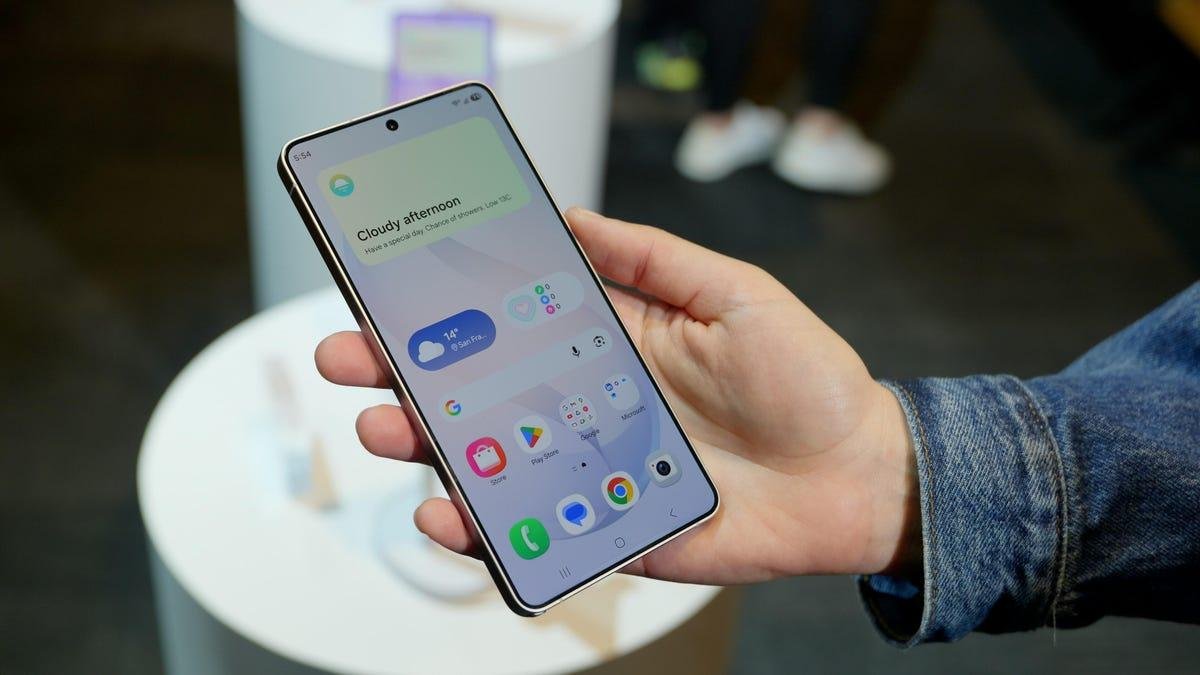
I had to double-check I was actually holding a typically bulky Samsung Galaxy Ultra phone, because this felt anything but.
With a slimmer and lighter build, the S26 Ultra feels less like a behemoth and more like a comfortable, yet substantial, large-screen phone. I got my hands on the Galaxy S26 Ultra at Samsung's media event in San Francisco on Monday, ahead of Wednesday's Unpacked keynote.
Before the briefing, I'd wondered if Samsung would incorporate the sleek designs of the Galaxy S25 Edge, Z Fold 7 and Z TriFold into its flagship lineup. Compared with last year's S25 Ultra, the differences are incremental. After swapping a titanium frame for an aluminum one, the S26 Ultra is 7.9mm thick and weighs 214 grams, compared with 8.2mm and 218g on the S25 Ultra. There are improvements to this year's model across the battery, camera and display that make this slight trim-down more impressive.
Watch this: First Look at the Galaxy S26 Ultra: Camera, Battery and AI Updates
Another element that didn't bulk up this year: The Galaxy S26 Ultra's $1,300 price. It's still not chump change, but at least this phone didn't get the same $100 price hike Samsung saddled onto the S26 baseline and Plus. All three phones are available for preorder now and will be available March 11.
You can turn on Privacy Display in Quick Settings to prevent others from seeing what's on your screen.
Celso Bulgatti/CNETGalaxy S26 Ultra display and design
Perhaps the most talked-about Galaxy S26 Ultra feature is the Privacy Display, which Samsung says is a first on a mobile device. With this feature enabled, the person sitting next to you won't be able to see what's on your screen. It's similar to how a privacy screen protector that you can buy separately works, but this is a built-in hardware feature.
Privacy Display also has more upscale features than you'll get with a $10 screen protector. You can set it to work with specific apps, or enable it on your phone's lock screen so no one sees your password or PIN.
You can opt for Privacy Display to obscure only your notifications as they roll in, but keep the rest of your screen visible, so you can, say, keep watching a YouTube video with the person beside you without them seeing your incoming messages. The feature works whether you're holding your phone vertically or horizontally. I was impressed with how well this functioned in person, and I appreciate the level of customization, so you don't have to be mysterious all the time.
Privacy Display works in either a horizontal or vertical configuration.
Abrar Al-Heeti/CNETFor richer and sharper photos and videos, the S26 Ultra borrows a feature from Samsung's TVs called ProScaler, which can upscale images on your screen.
Like last year's phone, the S26 Ultra's cover glass is made of Corning's Gorilla Armor 2, while the back is Gorilla Glass Victus 2.
With the switch to aluminum, Samsung carried the same color across the frame and the back of the phone. The S26 Ultra comes in the same color options as the S26 baseline and Plus: cobalt violet, sky blue, black and white. There are also two online exclusive colors: silver shadow and pink gold. In person, each of the standard hues takes on a more subdued tone.
The Galaxy S26 Ultra has a 200-megapixel wide-angle, 50-megapixel ultrawide-angle, 10-megapixel 3x telephoto and 50-megapixel 5x telephoto lens on the back.
Celso Bulgatti/CNETGalaxy S26 Ultra camera updates
With the camera often being the focal point of the S26 Ultra, Samsung brought a handful of updates, including a larger aperture to both the wide-angle and telephoto lenses to capture more light, resulting in clearer photos with more details in low-light environments. Nighttime videos also have reduced noise for crisper footage, Samsung says. I'm eager to snap my own images out in the real world and see how it all plays out.
Like last year's model, the S26 Ultra has a 200-megapixel wide-angle, 50-megapixel ultrawide-angle, 10-megapixel 3x telephoto and 50-megapixel 5x telephoto lens on the back, as well as a 12-megapixel selfie camera. The camera improvements are largely the result of software updates.
The camera feature that really stole the spotlight for me is Horizontal Lock. With this feature turned on, you can tilt the phone as much as you want while recording video, and it'll keep the horizon steady. That way, even if you're running or walking on a bumpy trail, you can still get a more stable video. I tried this out by turning and twisting the Ultra in each direction while walking, and there was only minor movement in the end result.
No matter how much I tilt the S26 Ultra, Horizontal Lock keeps that horizon steady.
Abrar Al-Heeti/CNETSelfies now capture more natural skin tones, textures and details, even in different lighting conditions. That's also something I look forward to trying out in different environments.
This feature's a little more mundane, but I think it's one that'll drastically improve my life. Within the Gallery, screenshots will now be organized into eight different categories so you can more easily find what you're looking for. That includes one for boarding passes, another for chats and one for barcodes and QR codes. So hopefully you don't have to frantically search through your Gallery when you arrive at an event, for instance.
Not surprisingly, many new camera features have an AI component. Photo Assist lets you use natural language directly within Gallery to change a photo's background, add an object or otherwise tweak the image. I tried this out by snapping a photo of a hoodie and asking Photo Assist to add it to an image of me, and it swapped my (real-life) denim jacket for the hoodie. The next time I look at a photo and regret not having worn something else, I suppose this'll come in handy.
When you're snapping a picture of a document, a prompt for a feature called Document Scan will appear to remove shadows, creases and obstructive fingers for a cleaner shot. You can export the final result as a PDF.
Now Nudge will suggest actions and information based on what's happening on your screen. Here, it proposes times that might work for a hangout.
Celso Bulgatti/CNETGalaxy AI features get more practical
The Now Nudge feature serves up real-time suggestions and information based on what's on your screen. For instance, if someone texts you asking to send pictures from your San Francisco trip, you'll see a prompt appear with photos from your Gallery that might be a fit. That way, you don't have to dig for them yourself. And if someone asks if you're free on Saturday, information from your Calendar will also automatically appear. The feature works with Samsung Messages as well as third-party platforms like Google Messages and WhatsApp. (If Now Nudge sounds familiar, it's a similar concept to Magic Cue on Google's Pixel 10 devices.)
Samsung is building upon its partnership with Google by expanding some Gemini AI capabilities. For instance, you can ask Gemini to book an Uber for you, which it'll then do on its own in the background, so you can keep using your phone however you'd like. When Gemini is done, you'll have the option to choose your ride and take over. This feature will launch with Uber and eventually expand to other apps like Instacart and DoorDash, Samsung says.
Google's Circle to Search also gets an upgrade. You can now search multiple objects on your screen simultaneously, so if you want all the details on an outfit, you can get the full breakdown on everything from the clothing to the accessories. (This update is also coming to Pixel 10 devices this week.)
Samsung added another AI partner to its roster: Perplexity. The company's AI agent will be embedded across Samsung apps, including Notes, Clock, Gallery, Reminder, Calendar and some third-party platforms, giving people the option to tap into different agents based on their preferences. It's not clear how exactly this shared AI ecosystem will work, so I look forward to playing around with this and seeing where each agent shines (and where they may collide in the process of fulfilling tasks).
Maybe one of the best ways to put AI to work is by having it screen your calls. Galaxy AI will now answer unknown numbers to identify who's calling and why, then summarize what it learns and give you the option to pick up the call. Along with Call Screening, a Scam Detection feature will alert you in real time if the person on the line seems suspicious and will warn you not to share any sensitive information.
The S26 Ultra has a 5,000-mAh battery and is powered by a Snapdragon 8 Elite Gen 5 processor.
Celso Bulgatti/CNETGalaxy S26 Ultra battery and performance improvements
Despite the slimmer build, the S26 Ultra features the same 5,000-mAh battery as last year. With improved 60-watt charging, the battery can go from 0% to 75% in 30 minutes, according to Samsung. The Ultra also supports up to 25-watt wireless charging. Stay tuned for my review to see how the battery fares in CNET's charging and endurance tests.
A little bit of bad news: There are still no embedded magnets in the S26 lineup, so you'll need to get a compatible case to tap into Qi2 magnetic charging. Samsung says it avoided adding magnets to keep its devices slim and light. Hopefully, it finds a way to maintain a sleeker frame for its phones while adding that highly requested component down the road.
Here's how the S26 Ultra (left) compares with the S25 Ultra. It's slightly thinner, at 7.9mm, instead of 8.2mm.
Vanessa Hand Orellana/CNETThe full S26 lineup is powered by the Snapdragon 8 Elite Gen 5 processor for Galaxy, which Samsung says delivers faster, smoother performance. That's critical as the company keeps adding more AI capabilities to its devices.
Samsung also redesigned the S26 Ultra's vapor chamber to maintain high performance in a thinner frame. Thermal interface material along the sides of the processor allows for more efficient heat dissipation across a larger surface area. That way, you can hopefully keep using your phone for high-demand activities without it heating up or lagging.
Despite some relatively modest cosmetic updates, there's a lot packed into the S26 Ultra, and I look forward to seeing how it keeps up with my everyday routine -- and if it proves as helpful and capable as it seems.
Samsung Galaxy S26 Ultra vs. S25 Ultra vs. S26 vs. S26 Plus
| Samsung Galaxy S26 Ultra | Samsung Galaxy S25 Ultra | Samsung Galaxy S26 | Samsung Galaxy S26 Plus | |
| Display size, tech, resolution, refresh rate | 6.9-inch AMOLED; 3,120x1,440 pixels; 1-120Hz adaptive refresh rate | 6.8-inch AMOLED; 3,120x1,440 pixels; 1-120Hz adaptive refresh rate | 6.3-inch AMOLED; 2,340x1,080 pixels; 1-120Hz adaptive refresh rate | 6.7-inch AMOLED; 3,120x1,440 pixels; 1-120Hz adaptive refresh rate |
| Pixel density | 500 ppi | 501 ppi | 411 ppi | 516 ppi |
| Dimensions (inches) | 6.44x3.07x0.31 | 6.41x3.06x0.32 | 5.89x2.82x0.28 | 6.24x2.98x0.29 |
| Dimensions (millimeters) | 163.6x78.1x7.9 | 162.8x77.6x8.2 | 149.6x71.7x7.2 | 158.4x75.8x7.3 |
| Weight (grams, ounces) | 214 g (7.55 oz.) | 218 g (7.69 oz.) | 167g (5.89 oz.) | 190 g (6.70 oz.) |
| Mobile software | Android 16 | Android 15 | Android 16 | Android 16 |
| Camera | 200-megapixel (wide), 50-megapixel (ultrawide), 10-megapixel (3x telephoto), 50-megapixel (5x telephoto) | 200-megapixel (wide), 50-megapixel (ultrawide), 10-megapixel (3x telephoto), 50-megapixel (5x telephoto) | 50-megapixel (wide), 12-megapixel (ultrawide), 10-megapixel (3x telephoto) | 50-megapixel (wide), 12-megapixel (ultrawide), 10-megapixel (3x telephoto) |
| Front-facing camera | 12-megapixel | 12-megapixel | 12-megapixel | 12-megapixel |
| Video capture | 8K | 8K | 8K | 8K |
| Processor | Qualcomm Snapdragon 8 Elite Gen 5 for Galaxy | Qualcomm Snapdragon 8 Elite for Galaxy | Qualcomm Snapdragon 8 Elite Gen 5 for Galaxy | Qualcomm Snapdragon 8 Elite Gen 5 for Galaxy |
| RAM + storage | 12GB RAM + 256GB; 16GB RAM + 512GB, 1TB | 12GB RAM + 256GB, 512GB, 1TB | 12GB RAM + 256GB, 512GB | 12GB RAM + 256GB, 512GB |
| Expandable storage | None | None | None | None |
| Battery | 5,000 mAh | 5,000 mAh | 4,300 mAh | 4,900 mAh |
| Fingerprint sensor | Under display | Under display | Under display | Under display |
| Connector | USB-C | USB-C | USB-C | USB-C |
| Headphone jack | None | None | None | None |
| Special features | Aluminum frame; 7 years of OS and security updates; IP68 water and dust resistance; wireless PowerShare to charge other devices; integrated S Pen; UWB for finding other devices; 60W wired charging (charger not included); 25W wireless charging; no magnets for accessories; Galaxy AI; Gorilla Glass Armor 2 cover glass; privacy display | Titanium frame, 2,600-nit peak brightness; 7 years of OS and security updates; 5G (mmWave); IP68 water and dust resistance; wireless PowerShare to charge other devices; integrated S Pen; UWB for finding other devices; 45W wired charging (charger not included); Galaxy AI; Wi-Fi 7; Gorilla Glass Armor cover glass; ultrawideband | 2,600-nit peak brightness; 7 years of OS and security updates; IP68 water and dust resistance; wireless PowerShare to charge other devices; 25W wired charging (charger not included); 15W wireless charging; lacks built-in magnets; Gorilla Glass Victus 2 cover screen; Galaxy AI | 2,600-nit peak brightness; 7 years of OS and security updates; IP68 water and dust resistance; wireless PowerShare to charge other devices; 45W wired charging (charger not included); 20W wireless charging; lacks built-in magnets; Gorilla Glass Victus 2 cover screen; Galaxy AI |
| US price starts at | $1,300 (256GB) | $1,300 (256GB) | $900 (256GB) | $1,100 (256GB) |