
Aurzen Eazze D1R Cube
Pros
- Compact and affordable
- Roku TV built-in
- Native 1080p resolution
- Autofocus and auto-keystone correction
- Sealed optical engine keeps out dust
- Two 5-watt speakers for sound
Cons
- No built-in battery
- Not so bright (330 ANSI lumens), so best used in a dark room
Late last year, Roku sent me a review sample of the Aurzen Eazze D1R Cube ($180), its first Roku-powered projector. I asked for that model over the newer (and $50 cheaper) Aurzen Eazze D1R Roku TV Projector because the D1R Cube is a little brighter, and when it comes to projectors, brightness is key. While its picture and sound fall a bit short of more expensive pico projectors, it did exceed my expectations for its modest price.
Read more: Best Portable Projector for Movies and Gaming Anywhere in 2026
Portable but no battery
If you haven't heard of Aurzen, that's not surprising given that it's one of many budget-friendly Chinese projector brands that have proliferated on Amazon. According to Google's AI search results, Aurzen is "a relatively new but well-received player in the entry-level market."
The first thing to know about Aurzen Roku projectors is that they don't have rechargeable batteries and must be plugged in -- part of the reason they're so affordable. On the plus side, the power cord is simple and doesn't require a bulky power brick.
Enlarge Image
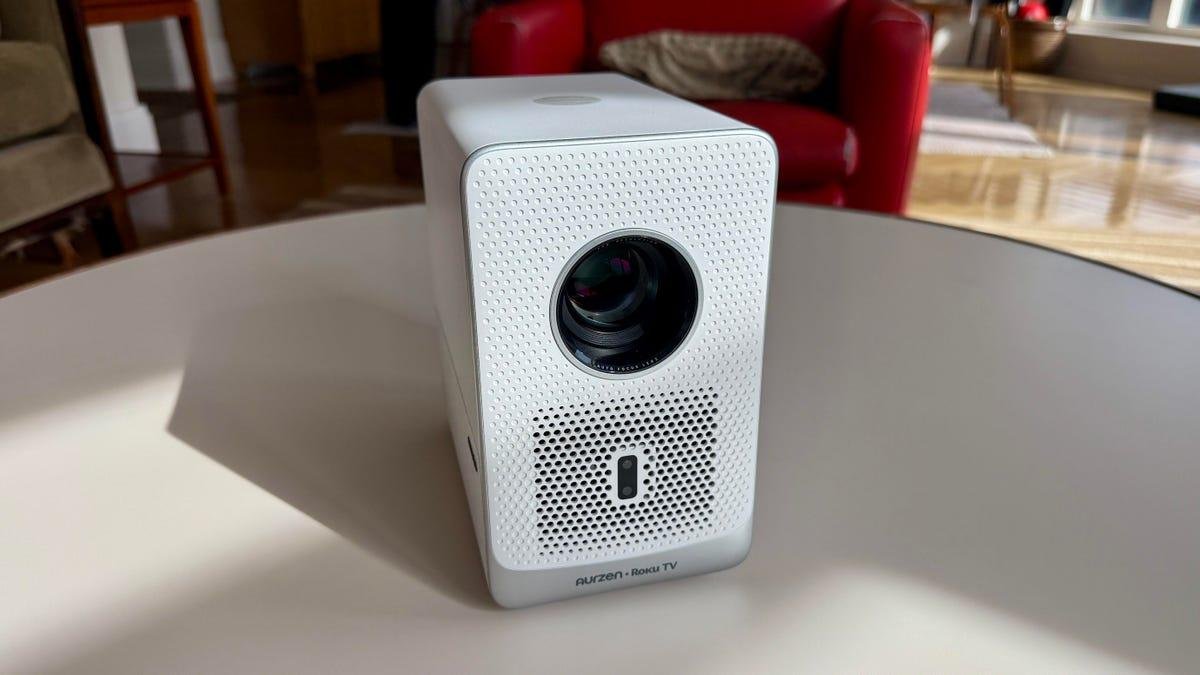
The Aurzen Eazze D1R Cube Roku TV projector has a sealed optical engine.
David Carnoy/CNETBoth the Aurzen D1R and D1R Cube are single-chip LCD projectors with sealed optical engines, a nice feature (no dust spots to clean off) that's becoming more common in entry-level models. The taller, narrower 4-pound D1R Cube has a brightness rating of 330 ANSI lumens, while the shorter, wider D1R is rated at 280 ANSI lumens. Both would be considered fairly dim by projector standards, but par for the course for budget projectors.
The projectors do offer native 1080p resolution (1,920x1,080 pixels) and are easy to set up, though you'll need a Roku account to use them and may need to keep an extension cord on hand, depending on placement. Each has a threaded tripod mount, which can give you more flexible projection options, and they also have autofocus and auto keystone correction to ensure your video is displayed properly, with no odd shapes or blurred images. There are manual focus settings for fine-tuning as well. I put the D1R Cube on a tripod and placed it on a small side table to get the image high enough (you could also put it on a coffee table and use the retractable foot to tilt the projector up at a slight angle).
The Roku interface.
David Carnoy/CNETI suspect most people just project on a wall or one of those cheaper stretched fabric screens for outdoor viewing. However, since I have a 110-inch Stewart screen for my Epson Home Cinema 5050UB reference projector (2,600 ANSI lumens), I used that, which helped improve the Aurzen's contrast and overall image quality.
The Aurzen D1R Cube is pretty rudimentary by enthusiast standards, but it gets the job done for casual viewing, particularly in a darkened room. The projector also gets a boost from Roku, which is arguably offers the best interface among media streaming platforms.
The step-down EAZZE D1R Roku TV Projector costs around $50 less but has a lower brightness rating (280 ANSI lumens).
Screenshot by David Carnoy/CNETConnections and app support
In the past, I've mainly tested Google TV pico projectors (and several earlier models that ran Android TV, which didn't support a Netflix app). Truth be told, one reason I'm a fan of Roku is that it has the Spectrum cable app, while Google TV-powered projectors and TVs don't. If you're a YouTube TV subscriber, using a Google TV projector isn't an issue either, since Roku also has a YouTube TV app, along with most other popular streaming services.
Ideally, it's better to run apps straight from the projector, but if you need to, you can use your phone, tablet or laptop to cast to the projector via Wi-Fi. The DR1 Cube and D1R support both MiraCast for Android devices and AirPlay for Apple devices to mirror what's on a phone or tablet.
The back of the Aurzen Eazze D1R Cube Roku TV with its inputs.
David Carnoy/CNETYou can also connect a thumb drive or external solid-state drive to the USB-A port on the back of the projector to stream files from the drive and use the Roku media player to play those files. (It was able to read most, but not all, of the video file formats I had on the drive, including MKV files.) At first, I couldn't figure out how to get to the drive input, but discovered you can access it from the Roku media player. For navigation between the various menus, the projector comes with a Roku remote that will be familiar to anyone who's used a Roku device before. Even if you haven't, it's an intuitive layout that won't take long to master.
There's an HDMI port if you want to connect a Blu-ray player, game console, laptop or another streaming device, but I didn't try to play any physical media like a UHD disc as the projector won't show it in its best light. Though you might be able to get a slightly better image (it accepts 4K video but downscales to 1080p), there doesn't appear to be any support for HDR, just SDR, which jibes with its meager light output.
The projector has six picture settings, but most people should just use the Roku Smart Picture mode.
David Carnoy/CNETThe projector has six picture settings, with some ability to make manual adjustments to contrast, brightness, color, tone and sharpness. The Roku Smart Picture setting is probably the best option for most people. It auto-adjusts the mode for whatever you're watching, and it ended up being close to Cinema mode (when I was watching a movie), with the most accurate-looking colors. You can make some tweaks to the brightness setting for more shadow detail, but like many of these budget projectors, this one performs best with brighter material and isn't as good with darker scenes (its black levels are OK but not a strong point).
The marketing materials for both projectors say you can project an image up to 200 inches, but just because you can doesn't mean you should. In reality, you'll want to stay in the 55- to 65-inch range, or the image will look too washed out. As it is, the image is a tad soft compared with what you may be used to on a big-screen TV. That said, the image quality was certainly acceptable and better than I expected given the price.
There's a 5-watt speaker on each side of the projector.
David Carnoy/CNETIts sound is OK, too. The projector is equipped with two 5-watt speakers, and while there isn't all that much bass, the midrange, where dialog lives, sounded decent. I stuck with the Theater mode for sound, which widened the sound stage a bit. The projector does have a Bluetooth connection, so you could link it to a larger Bluetooth speaker or soundbar for better audio. But most people probably won't bother with that.
While I was pretty happy watching TV and streaming videos with it, I wouldn't recommend this projector for gaming because there was some appreciable input lag.
Watching Mickey 17.
David Carnoy/CNETAurzen DR1 Cube final thoughts
Over the years, I've tested several sub-$500 Anker Nebula pico projectors, as well as a few Xgimi models. One big difference with those projectors is that they have built-in batteries, allowing you to place them anywhere without worrying about plugging them into a power source (though they typically offer only around two hours of battery life).
The Anker Nebula Mars 3 Air, one of our current favorite portable projectors and a CNET Editors' Choice winner, is brighter than this Aurzen, with a 400 lumens rating and has slightly better picture sound quality, too. (I've tried it, but CNET contributor and home-theater guru Geoff Morrison reviewed it.) However, it costs closer to $500. (Note that with all these projectors you have to take their stated brightness ratings with a grain of salt, as they often measure out at lower levels, particularly when it comes to certain picture modes).
More Mickey 17.
David Carnoy/CNETFrom what I've seen in this price range -- and there is a lot out there within the $130 to $200 range -- the Aurzen Eazze DR1 Cube Roku TV smart projector stacks up well from a picture and sound standpoint. But what ultimately gives it an edge is the Roku platform.
Whether you should get the DR1 Cube or the $50 less expensive DR1 is a hard choice. While I haven't tested the $130 DR1 at home, I have seen it in action, and its picture isn't quite as vibrant as DR1 Cube's, but it's not a big step down, and you could put the $50 toward a screen for a backyard movie night.