


OST to PST Converter Software
OST to PST Converter Software: A Complete Guide to Safe Outlook Data Migration
Microsoft Outlook stores offline mailbox information in an OST (Offline Storage Table) file. These files allow users to work with emails, contacts, calendars, tasks, and other mailbox data even when Outlook is disconnected from the mail server. However, OST files are closely associated with the Outlook profile and Exchange account that created them. When an account is removed, a profile becomes unavailable, or an OST file becomes inaccessible, users may need another way to retrieve and preserve their mailbox data.
This is where OST to PST Converter Software can be useful. Such software is designed to extract mailbox information from an OST file and save it into a PST (Personal Storage Table) file that can be opened and managed in compatible versions of Outlook.
Understanding OST and PST Files
Although both OST and PST are Outlook data-file formats, they serve different purposes.
An OST file primarily provides an offline copy of mailbox data synchronized with an Exchange, Microsoft 365, or compatible mail environment. Because it is linked to a particular Outlook profile, simply moving an OST file to another computer does not always make its contents accessible.
A PST file, on the other hand, is designed for portable storage and data management. Users can import or open PST files in Outlook to access emails, contacts, calendars, tasks, and other supported mailbox items.
The difference between these formats explains why organizations and individual users may need an OST to PST converter when recovering or migrating mailbox information.
Why Convert OST to PST?
There are several legitimate situations where OST to PST conversion can be useful.
One common scenario is an orphaned OST file. If the original Exchange account or Outlook profile is no longer available, the user may still have important information stored in the local OST file.
Another situation involves computer replacement or mailbox migration. An organization may need to preserve historical mailbox data before changing systems. Converting the accessible data into PST format can provide a convenient archive for future reference.
Other use cases include:
-
Recovering accessible emails from an orphaned OST file
-
Migrating mailbox data between environments
-
Archiving older Outlook information
-
Preserving business correspondence
-
Extracting contacts, calendars, and tasks
-
Recovering data when the original Outlook profile is unavailable
-
Creating a portable copy of mailbox information
The exact recovery possibilities depend on the condition of the OST file and the data contained within it.
How OST to PST Converter Software Works
Professional OST to PST Converter Software generally follows a structured conversion process.
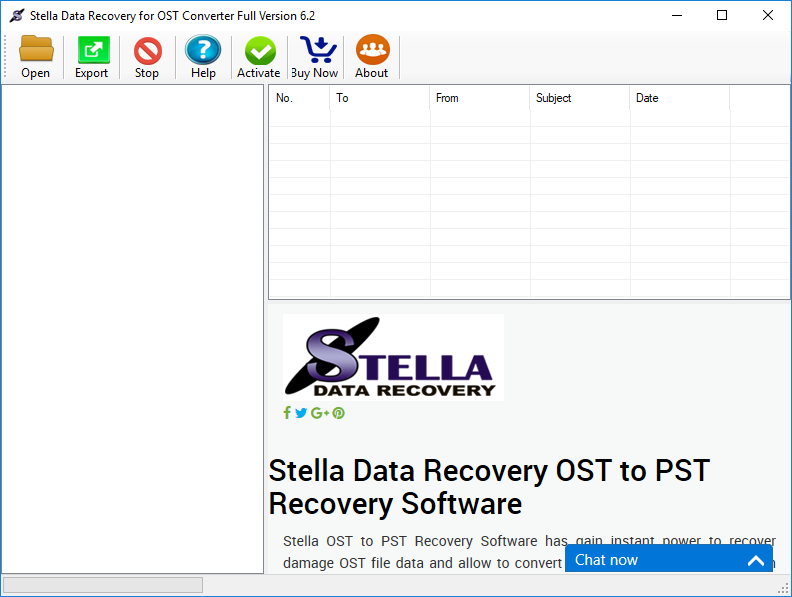
First, the application analyzes the selected OST file and checks whether its internal structures can be read. Depending on the software, it may display folders such as Inbox, Sent Items, Drafts, Deleted Items, Contacts, Calendar, and custom folders.
The user can then select the required mailbox folders or choose to process the complete file. During conversion, the application extracts supported mailbox items and reconstructs them into a PST-compatible structure.
Finally, the recovered information is written to a new PST file. The resulting PST can then be opened or imported into Outlook, depending on the Outlook version and the user's requirements.
A well-designed converter should preserve important properties such as email subject, sender, recipient, date, attachments, folder hierarchy, and other supported metadata.
Important Features to Look For
Not every OST conversion utility provides the same capabilities. When evaluating software, users should consider several technical features.
1. Support for Different OST Files
The software should support the OST variants relevant to the Outlook environment being processed. Compatibility with modern Outlook-generated files is particularly important.
2. Folder Structure Preservation
Maintaining the original mailbox hierarchy can make the converted PST significantly easier to use. Important folders and subfolders should remain organized after conversion whenever technically possible.
3. Email and Attachment Recovery
A useful converter should process both message content and associated attachments. Users should verify the supported attachment types and size limitations before beginning a large conversion.
4. Selective Conversion
Selective conversion can save considerable time. Instead of converting an entire mailbox, users may want to export only specific folders, such as Inbox, Sent Items, or Contacts.
5. Preview Capability
A preview feature allows users to inspect recoverable mailbox items before exporting them. This can help determine whether the OST file contains the information they need.
6. Large File Handling
Business OST files can become very large. Software intended for professional use should be designed to process large files without unnecessary crashes or memory consumption.
7. Data Integrity
Conversion should prioritize preserving the original information. Users should avoid tools that make unrealistic claims about recovering data that no longer exists inside the source file.
OST to PST Conversion Without Outlook
One frequently searched requirement is OST to PST conversion without Outlook. Traditional Outlook-based methods are not always suitable when the original Exchange account or profile is unavailable.
A dedicated converter can potentially read the OST directly and create a PST without requiring the original mailbox connection. This is particularly useful for orphaned OST scenarios.
However, users should understand that an OST file is not simply a renamed PST file. Changing the extension from .ost to .pst does not perform a valid conversion. The internal database structures and data relationships are different, so a proper conversion process is required.
A Typical Conversion Workflow
A practical OST-to-PST workflow can be summarized as follows:
-
Create a backup of the original OST file.
-
Install a reputable OST to PST converter.
-
Select the OST file from its storage location.
-
Allow the software to scan and analyze the file.
-
Preview available folders and mailbox items.
-
Select the data that needs to be exported.
-
Choose PST as the destination format.
-
Start the conversion process.
-
Open or import the resulting PST in Outlook.
-
Verify emails, folders, attachments, contacts, and other important information.
Keeping the original OST untouched is an important precaution because it provides a source copy if the conversion needs to be repeated.
Best Practices for Safe OST Conversion
Before starting a conversion, users should ensure that sufficient disk space is available for both the source and destination files. Large mailbox conversions can require substantial temporary and destination storage.
It is also advisable to close unnecessary applications during intensive conversions, particularly when processing large files. If the software offers a scan or preview mode, reviewing the detected mailbox structure before exporting can help identify potential problems.
For business-critical data, always maintain multiple backups. A converted PST should not become the only copy of important correspondence.
Users should also verify the resulting PST after conversion. Open the file in a compatible Outlook environment and check several folders, attachments, dates, and representative messages.
Choosing the Right OST to PST Converter
The best OST to PST Converter Software depends on the specific recovery or migration requirement. A home user recovering a small mailbox may need only basic conversion and preview functionality, while an organization handling large or damaged OST files may require advanced scanning, selective recovery, batch processing, and detailed reporting.
Before purchasing software, check its supported Outlook versions, OST file compatibility, output options, file-size limitations, licensing terms, and technical support.
A trustworthy product should clearly explain what it can recover and should avoid promising guaranteed recovery from severely damaged or incomplete files.
Conclusion
OST files are valuable for offline Outlook access, but their profile-dependent nature can make them difficult to access when the original Exchange account or Outlook profile is no longer available. OST to PST Converter Software provides a practical method for extracting accessible mailbox data and creating a portable PST file for archiving, migration, or recovery.
The most important factors are compatibility, data integrity, folder preservation, attachment handling, preview functionality, and reliable large-file processing. By backing up the original OST file, selecting appropriate conversion software, and carefully verifying the resulting PST, users can make the migration process more organized and reduce the risk of losing important mailbox information.
For organizations and individuals dealing with legacy or inaccessible Outlook data, a properly designed OST to PST Converter can be an effective part of a broader email recovery and data migration strategy.
Sponsored
Ads
Ads
Ads
Categories
Read More
Romanian PM Ilie Bolojan ousted in no-confidence voteReutersBolojan has clashed with coalition partners over austerity measuresRomanian MPs have voted to remove Prime Minister Ilie Bolojan in a no-confidence vote in parliament.The largest party, the left-wing Social Democrats, abandoned Bolojan's four-party coalition last month and joined the far-right opposition to call for the vote.The Social...

Introduction You have the perfect design, a high-quality machine, and the ideal fabric. You hit start, and the thread breaks. Or the colors look dull. Or the embroidery feels stiff and uncomfortable against the skin. I have been there, and it is incredibly frustrating. The problem is not your machine or your design. It is your thread. Choosing the right thread is one of the most important...

This Ghost in the Shell keyboard makes me want to activate the hundred spidery robot fingers inside my regular fingersAnime collaborations are everywhere, from Gundam watches and Naruto nights at Major League ballparks to just about anything Evangelion. But these Ghost in the Shell keyboards from Iqunix are some of the coolest examples I’ve seen of anime-inspired everyday tech. They look sick...

In ARC Raiders, Voltage Converters are not just another crafting component-they are essential for progressing in Expedition Projects. For example, the third Expedition now requires Voltage Converters to complete certain objectives. Beyond expeditions, they are also required in the crafting of Heavy Shields, which provide superior defense in ARC Raiders Coins high-stakes matches, and Showstopper...

Gold Prices Today: February 4, 2026 We research all brands listed and may earn a fee from our partners. Research and financial considerations may influence how brands are displayed. Not all brands are included. Learn more. By:...

