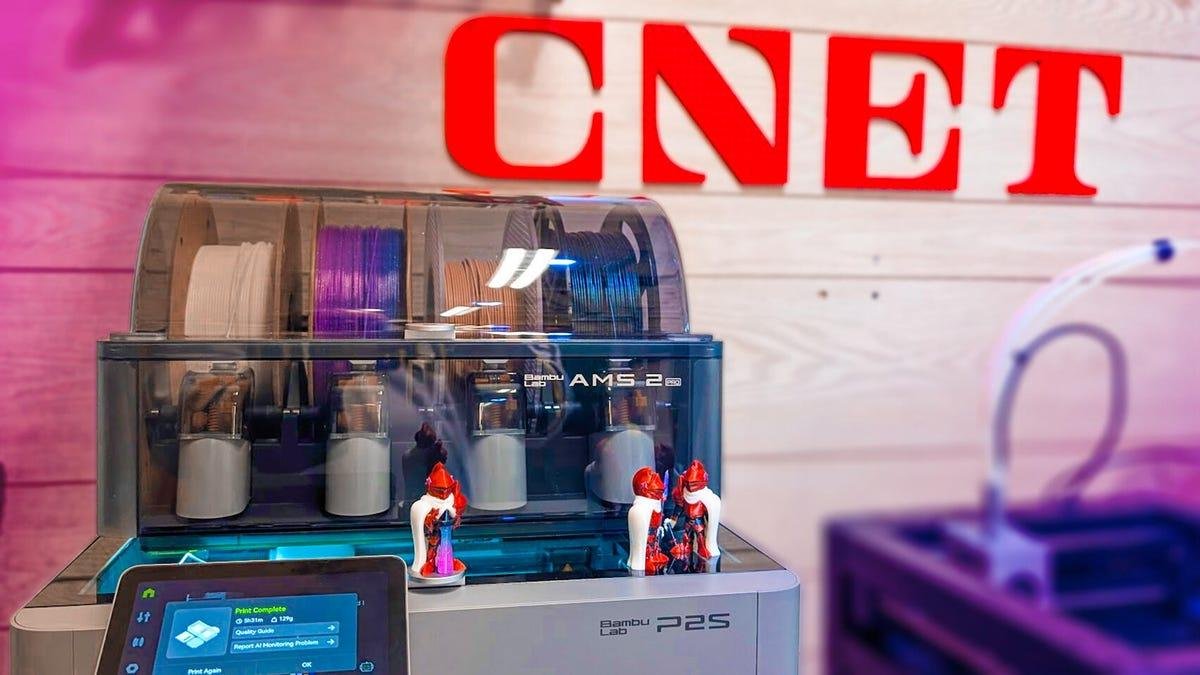



Editor's Note: The P2S is the best all-around 3D printer that I've seen in a while. The new cooling and venting system helps print quality, and all the small updates from the original P1S have resulted in a 3D printer that is just about perfect for every potential owner. Which is why it received a CNET Editors' Choice Award in 2026. The original review follows.
Incremental upgrades are par for the course in every industry. Even the best 3D printers are often the third or fourth iteration of an original product line.
3D printing has reached a point of maturity where established companies like Bambu Labs now have product lines that truly connect with specific audiences. If you’re already into 3D printing, a new release from a trusted brand almost feels like upgrading your phone on a regular schedule. And just like with phones, you can upgrade every couple of years when you’re ready — or every year, like I do with my Pixel phones.
Yes, I’ve owned them all. No, I don’t have a problem. It’s fine.
3D printing company Bambu Lab recently launched its newest machine, an upgrade to its most popular 3D printer, the P1S. Called, unsurprisingly, the P2S, this new printer makes incremental updates the way they should be done. It improves everything while staying true to what made the original so darn good.

9.2
Bambu Lab P2S
Like
- All-around the P2S is simply the best 3D printer to own
- The quality, speed, and accuracy are above reasonable expectations
- Adaptive Airflow means you can print any material with the door closed without compromising quality
- Your chamber stays at the temperature it should
- The P2S upgrades all the parts of the P1S that I disliked and the P1S is a former best overall winner.
Don't like
- The waste you get from color printing is still there and it's still too much
Under the hood, the P2S uses a lot of what we know and love, with some concessions for price and some cool upgrades, too.
The entire chassis and much of the infrastructure are clearly inspired by Bambu's most well-known printer, the X1 Carbon. The carbon rods that gave the X1C its name have been swapped for smooth, steel rods that are cheaper, and, frankly, easier to maintain. Those of you who have used the X1C know this isn't a bad thing. To get a machine like the X1C for the price of a P2S is a bargain.
The hot end has been redesigned using the same magnetic servo extruder that the H2D uses. Bambu Lab says the maximum force the extruder can exert has increased by around 70%, so you should be able to push more filament through faster than ever. Coupled with the hardened steel nozzle from the H2D rather than a stainless steel one, you have a machine that's equal to the X1C in almost every way.
It also has the adaptive airflow system from the H2D. It pulls cool air into the printing chamber while printing cooler materials like PLA and vents warm air out of the back, keeping the entire airflow system fresh and even. It works really well and means I don't need to keep the door open while printing these cooler materials.
Bambu Lab P1S versus Bambu Lab P2S
| Bambu Lab P1S | Bambu Lab P2S | |
| Build Volume | 256 x 256 x 256mm | 256 x 256 x 256mm |
| Printer dimensions | 389 x 389 x 458mm | 392 x 406 x 478mm |
| Hot end | All metal | All metal |
| Nozzle | 0.4mm (Optional 0.2, 0.6, 0.8) Stainless steel | 0.4mm (Optional 0.2, 0.6, 0.8) hardened steel |
| Max speed | 500mm/s | 600mm/s |
| Supported material | PLA, ASA, PETG, PVA, TPU (Non AMS) | PLA, ASA, PETG, PVA, TPU (non AMS) |
| Filament Run out sensor | Yes | Yes |
| Color system | Yes | Yes |
| Storage | Micro SD card, 4GB internal | USB-A port, 8GB internal |
| Slicer | Bambu Studio (Other slicers compatable) | Bambu Studio (Other slicers compatable) |
| Build plate camera | Yes | Yes (1080p) High FPS |
| Color support | AMS x 4 (16 colors total) | AMS 2 Pro x 4, HT x 4 (20 colors total) |
Like most of the best printers of the last few years, the P2S did a great job printing the CNET test print. The 0.2mm tolerance test was snug, but not fused; the steeples were sharp with no stringing and the text on the back of the model showed no sign of ringing. Ringing occurs when the 3D printer vibrates too much on the workbench, and it's the bane of these high-speed 3D printers, but the P2S handled it like a champ.
While I haven't managed to hit the 100 hours of printing that I need to call this a review, I've been printing up a storm with as many materials as possible, and so far, the results have been excellent.
No matter the size or shape of the model, the P2S handles it all easily and prints crisp and clear. Even deep overhangs above 65 degrees looked great. Having multiple models in the print area was also no problem for the P2S. It's going to be an absolute workhorse.
This is Hazy and the P2S printed him without any errors.
James Bricknell/CNETMulticolor printing is also a breeze, as you would expect with a P-series printer. Like the H2D, the P2S is compatible with the new AMS2 and the OG AMS, so if you're upgrading from your old P1S, you can keep your old AMS and have an eight-color setup with minimal effort. Eight colors are not the most it can support, either. You can connect up to four AMS units along with four single high-temperature holders, giving you a maximum of 20-color printing if you really want to go all out.
You'll need a lot of money, but it can be done.
The standard issue of waste is still there, however, and the more materials you use, the more waste you will accumulate. I printed the Hazy project model on my own, and the model weighed just over half of what the waste did. The more color changes, the more waste, so if you are thinking of printing in color, print in batches if you can.
Using the P2S really does feel like using the X1 Carbon, right down to the large LCD screen with the latest Bambu Lab software. The LCD upgrade alone makes the P2S a far more usable machine than the tiny dot matrix display of the P1S.
The P2S takes everything great about the P1S, mixes it with some X1 Carbon guts and sprinkles in the latest tech from the H2D to produce a 3D printer that's going to last you for years to come.
Currently, the P2S is listed at $549 for the 3D printed on its own, and $799 for the combo that includes the AMS. Given the amount of solid upgrades from the P2S, a $50 increase is pretty good.