Security cameras come packed with features and advanced detection options, but one add-on is always popular: A bright light to light up a yard, driveway or dark corner. The LED lights today's cameras come with are highly customizable, with smart features that help cut down on accidental activation.
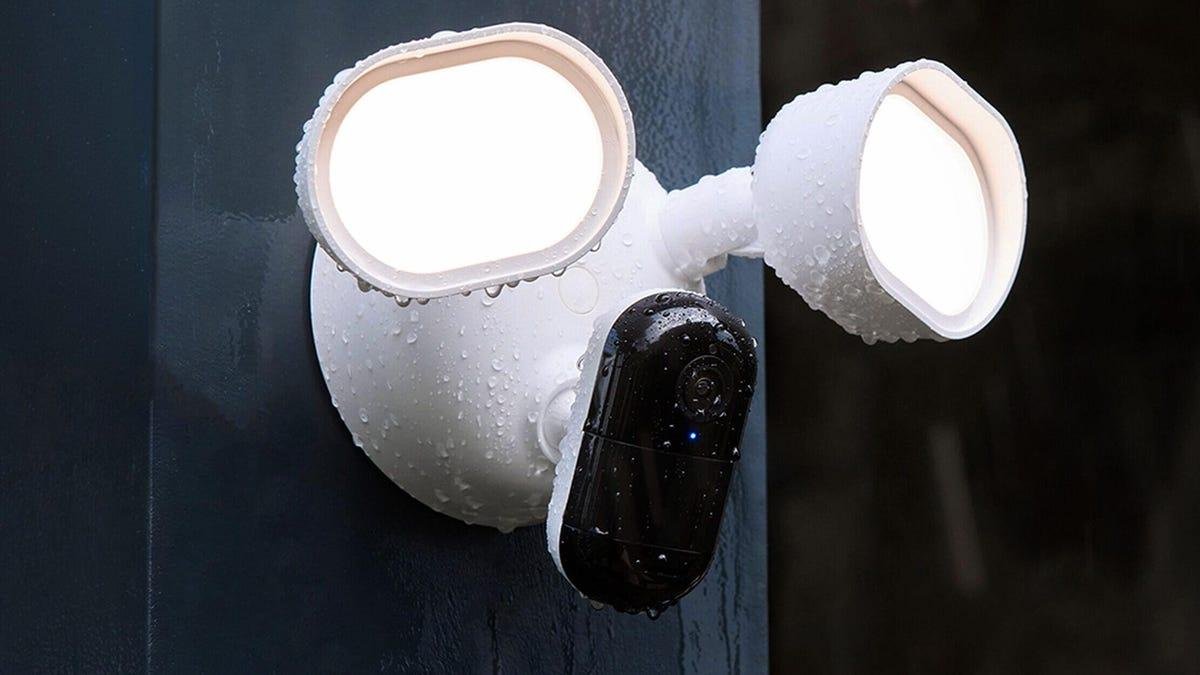
A floodlight cam has many jobs, but the most important is illuminating a large, dark space. Lorex’s cam makes this easier than any other cam we’ve reviewed, thanks to its fully customizable LED panels. You can adjust the brightness and color temperature of the lights to get the perfect shade or find the brightness that your neighbors can live with, as well as adjust the angle of the panels to help spread or focus the light where you want it most. Then you have the option to pick between modes like motion-activated, scheduled lighting and other choices to tweak the lights. These can be set to your preference whether your lights are more permanent or security-oriented. We haven’t found another floodlight model with quite so many options.
Pros
- Highly adjustable and bright LED panels
- 2K resolution
- Several light modes
- Free object detection
- Alexa and Google Assistant support
- Local storage included
Google Nest's floodlight camera is one of the brand's most expensive models, but you really do get what you pay for. In this case, that includes a Nest camera that you can detach and use elsewhere with a compatible base, giving you more options.
Pros
- Adjustable, bright and durable
- Google's object detection and recognition is very accurate
- Can take the camera off and use it for other purposes
- Several hours of free cloud storage
Cons
- Expensive at over $250
- Only 1080p resolution, which may be low for some buyers
Spotlights are designed to shine a bright light in a smaller space, like an entryway or particularly dark zone that benefits from direct illumination. Ring's latest battery model is one of the better spotlights I've found, with bright LEDs that handily back up the color night vision, letting the camera see clearly in any conditions. Ring's latest 2K Retinal video also helps pick up the details.
Pros
- Focused, bright spotlight design
- Battery design for easy installation
- Motion zone options
- Built-in siren and two-way audio
Cons
- Alexa only
- Object detection locked behind subscription
Floodlights and spotlights are primarily designed for outdoor spaces. If you’re interested in a smaller, more nimble lighting option, the Blink Mini 2K Plus fits easily in your palm. That doesn't stop it from offering a mini spotlight, two-way audio and the latest 2K resolution Blink has added to the cam.
Pros
- Small
- Affordable
- Surprisingly bright mini LED
- Easy app controls
- Two-way audio
- Outdoor option
- Upgraded 2K resolution
Cons
- Person detection, cloud storage and AI locked behind subscription
A wireless floodlight cam is a risky bid for outdoor protection since large LED panels -- even as energy-efficient as they are -- can still drain battery life when used frequently. We walked away from our Arlo Pro 3 Floodlight testing deeply impressed with its battery and all-around usability. The 2K resolution with HDR is great, motion detection with activity zones is accurate and the pivoting mount makes it easy to angle the camera however you want.
Pros
- Bright floodlight in a wireless model
- 2K resolution
- Great motion detection
- Two-way audio
Cons
- Important features are kept behind a subscription paywall
INDOOR SECURITY CAMERA DEALS OF THE WEEK
Deals are selected by the CNET Group commerce team, and may be unrelated to this article.
I've tested over a dozen of the latest models with spotlights and floodlights to see what works best, and when these lights complement camera design, storage, resolution and more.
What's the best home security camera with lights?
Security cameras benefit from adjustable lights.
LorexIf you're looking to add this type of security light to your setup, our top recommendation is the Lorex 2K Wi-Fi Floodlight Camera. It's subscription and cloud-free, and has bright, highly customizable LED panels plus a strong resolution and plenty of smart feature support.
We've also included models from Eufy, Blink, Arlo and Ring, covering everything from simple dock spotlights to decorative outdoor camera lights. We also have guides on outdoor security cameras and home security systems for even more information on keeping your home secure.
Best home security cameras with lights
Pros
- Highly adjustable and bright LED panels
- 2K resolution
- Several light modes
- Free object detection
- Alexa and Google Assistant support
- Local storage included
A floodlight cam has many jobs, but the most important is illuminating a large, dark space. Lorex’s cam makes this easier than any other cam we’ve reviewed, thanks to its fully customizable LED panels. You can adjust the brightness and color temperature of the lights to get the perfect shade or find the brightness that your neighbors can live with, as well as adjust the angle of the panels to help spread or focus the light where you want it most. Then you have the option to pick between modes like motion-activated, scheduled lighting and other choices to tweak the lights. These can be set to your preference whether your lights are more permanent or security-oriented. We haven’t found another floodlight model with quite so many options.
Beyond the lighting, Lorex’s cam offers several other desirable features including color night vision, a 2K resolution and free object detection to cut down on false alerts. Lorex also favors local storage so you can stay off the cloud and away from subscription fees, although the camera does support Alexa and Google Assistant.
Pros
- Adjustable, bright and durable
- Google's object detection and recognition is very accurate
- Can take the camera off and use it for other purposes
- Several hours of free cloud storage
Cons
- Expensive at over $250
- Only 1080p resolution, which may be low for some buyers
Google Nest's floodlight camera is one of the brand's most expensive models, but you really do get what you pay for. In this case, that includes a Nest camera that you can detach and use elsewhere with a compatible base, giving you more options.
I also like Google's AI detection capabilities: There's no Gemini for Home expanded features for this cam, but for free you still get the ability to spot things like packages and people, with alerts you can tailor based on what you want to know about. There's no local storage, but Google does offer 3 hours of free cloud storage for your videos, which is typically enough time to view them and download if necessary.
Those features make this a versatile camera that offers plenty without extra fees, and of course it comes with excellent Google Home app compatibility.
Pros
- Focused, bright spotlight design
- Battery design for easy installation
- Motion zone options
- Built-in siren and two-way audio
Cons
- Alexa only
- Object detection locked behind subscription
Spotlights are designed to shine a bright light in a smaller space, like an entryway or particularly dark zone that benefits from direct illumination. Ring's latest battery model is one of the better spotlights I've found, with bright LEDs that handily back up the color night vision, letting the camera see clearly in any conditions. Ring's latest 2K Retinal video also helps pick up the details.
The HD cam is compact enough with its built-in LED panels that it won’t take up too much space in a corner, and Ring’s highly customizable motion detection helps you conserve battery life, although you do need to pay a subscription fee (starting at $5) for object detection. The camera also includes two-way audio and a siren for audio action. Since Ring is an Amazon brand, voice assistant compatibility is limited to Alexa.
There's a 4K, wired version of this camera as well, but I prefer the options that the battery model provides. Just keep in mind if the spotlight goes off all the time, it will affect battery life.
Pros
- Small
- Affordable
- Surprisingly bright mini LED
- Easy app controls
- Two-way audio
- Outdoor option
- Upgraded 2K resolution
Cons
- Person detection, cloud storage and AI locked behind subscription
Floodlights and spotlights are primarily designed for outdoor spaces. If you’re interested in a smaller, more nimble lighting option, the Blink Mini 2K Plus fits easily in your palm. That doesn't stop it from offering a mini spotlight, two-way audio and the latest 2K resolution Blink has added to the cam.
At this size, the cam is a good fit for an entryway table or small patio where you want to keep watch and occasionally light the space up for a much better look (it greatly improves the night vision, too). The smooth operation of the Blink app makes those steps easy even for new users, and if you add the outside cable, you can post Blink's camera outdoors (as long as there's a nearby outlet).
Blink isn't just upgrading its camera design. The company now has a tier of AI plans that add abilities like AI-generated summaries for your video alerts to help save time. Blink's plans, which include cloud storage too, range from $4 to $7 per month for one device.
Pros
- Bright floodlight in a wireless model
- 2K resolution
- Great motion detection
- Two-way audio
Cons
- Important features are kept behind a subscription paywall
A wireless floodlight cam is a risky bid for outdoor protection since large LED panels -- even as energy-efficient as they are -- can still drain battery life when used frequently. We walked away from our Arlo Pro 3 Floodlight testing deeply impressed with its battery and all-around usability. The 2K resolution with HDR is great, motion detection with activity zones is accurate and the pivoting mount makes it easy to angle the camera however you want.
Arlo’s cams ditch limitations to embrace a do-everything design and this particular model even works with Apple HomeKit if you purchase an additional Arlo hub. The brand does lock quite a few features, including object detection and video storage, behind a subscription fee starting at $8 per month.
Pros
- Decorative light design
- Local video storage and free motion detection
- Solar panel for easy recharging
Cons
- 300 lumens is pretty dim for a security cam light, so it won't have the same impact as a floodlight
Eufy's innovative approach to a security camera with a light has two benefits. First, its decorative look makes it easy to install without seeming like a threat or intrusion on privacy, with the light providing helpful illumination that's ideal for highlighting patio steps, deck edges and other safety features.
Another advantage of this cam is its built-in solar panel. which means you can install it nearly anywhere (especially a wall that gets a lot of sunlight) and won't have to worry much about keeping the battery charged.
Eufy's camera also has security benefits, including object detection, two-way audio and built-in video storage, making it a complete package in a compact, pleasing form.
Best home security cameras with lights compared
| Best home security cameras with lights | Lorex 2K Wi-Fi Floodlight Camera | Google Nest Cam with Floodlight | Ring Spotlight Cam Pro (2025) | Blink Mini 2K+ | Arlo Pro 3 Floodlight Camera | Eufy Solar Wall Camera S120 |
|---|---|---|---|---|---|---|
| Price | $250 | $264 | $200 | $26 | $250 | $80 |
| Resolution | 2K | 1080p | 2K | 1080p/HD | 2K | 1080p |
| Light | Adjustable LED floodlight panels 1,500-2,400 lumens | LED adjustable panels, 2,400 lumens | LED spotlight panels 700 lumens | Mini LED spotlight | LED floodlight panel 2,000-3,000 lumens | LED panel, 300 lumens |
| Field of view | 122-degree | 130-degree | 140-degree (horizontal) | 138-degree | 160-degree | 120-degree |
| Power source | Wired | Wired | Battery | Wired | Battery | Solar battery |
| Motion detection | Motion, people, animals, vehicles | Motion, people, packages. animals, vehicles | Motion, object detection (subscription-only) | Motion, person (subscription-only) | Motion, person, package, vehicle, animal (subscription-only) | Motion, person, |
| Night vision | Color night vision | Night vision | Color night vision | Night vision | Color night vision | Color night vision |
| Audio | Two-way audio | Two-way audio | Two-way audio, siren | Two-way audio | Two-way audio | Two-way audio |
| Voice assistant | Amazon Alexa, Google Home | Amazon Alexa, Google Home | Amazon Alexa | Amazon Alexa | Amazon Alexa, Google Home, Apple HomeKit/Home/Siri (with SmartHub) | Amazon Alexa, Google Home |
| Review score | N/A | 8 | N/A | 7.8 | 9 | N/A |
The Google Nest floodlight cam is so useful I haven't bothered taking it down yet.
Tyler Lacoma/CNETGoogle Nest Cam with Floodlight: I liked the Google Nest Cam with Floodlight in our review, but it’s an expensive camera with fewer customization options than our top picks. It’s a good choice for those who want a few hours of free cloud storage for video download opportunities. For the record, I still use mine and think it's a great high-end choice.
Arlo Pro 2K 5S: This Arlo cam is one of our favorite all-rounders, but it’s not the best choice if you want to focus on lighting up an area, although it does have a spotlight, among many other features.
Blink Floodlight Mount: We love the Blink Outdoor cam line, but don’t like the idea of buying an additional mount just to get a lighting option.
Ring Spotlight Cam Plus: Ring's latest Retinal 2K battery spotlight camera is a significantly upgraded version of this model, and the prices are close enough that there's no reason for us to recommend the older camera anymore.
Eufy's cam settings, once found, provide many different ways to customize the camera.
CNET/Tyler LacomaAt CNET we spend hours with every camera, carefully testing its quality and smart features. That includes testing how well it can detect people and ignore cars, what the resolution really looks like and how well the app performs. We also test in a variety of low-light conditions to get a good idea of how night functions and how well those lights actually illuminate. For more on how we install and test cameras (and occasionally cosplay as burglars), take a look at our full testing guide.
Eufy's cam can keep an eye on large spaces.
CNET/Tyler LacomaLighting
What sort of lighting do you want? We prefer to see long-lasting LEDs (a norm in home security these days), and broader panels or bright spotlights with well over 1,000 combined lumens to really light an area up. Some may prefer a more direct light for a particularly dark corner or porch. We also prefer lots of control over brightness, light scheduling and colors, which is a significant reason the Lorex floodlight cam made it to our top spot.
Cost
Security cameras with big, bright lights tend to be much more expensive than the average cam. The best models tend to go above $200, but we look for cost-saving options where possible. Ultimately, we don’t think it’s worth sacrificing quality for a lower price: Having a light panel go dark after a year of use feels bad no matter how much money you saved.
Camera quality
Lights pair well with high-quality camera resolution and fields of view over 130 degrees if possible. You’ll notice many of our picks offer a 2K resolution, which is excellent for grabbing more details when a camera is positioned high over a wide area, which is a common case for cams with lighting.
Power
Consider whether you want a battery-powered cam or a wired option. When it comes to spotlight or floodlight cams, wired versions are common. A battery option may be more versatile, but bright lights can run down batteries quickly and floodlight cams are often placed in areas where retrieving the battery for charging could be difficult.
Object detection
You don’t want your lighting to switch on every time a leaf blows by. Object detection that can ignore cars and animals and focus on people is a great asset for cams with lights. We prefer to see object detection available for free, but it’s often locked behind a subscription fee (along with cloud video storage). Consider if you want to pay ongoing costs for your camera.
Audio features
If the light catches something unexpected, it’s nice to have an audio option so that you can hold a conversation or at least use your best shouty voice. This goes hand-in-hand with a high-quality app that’s easy to understand and use, letting you access microphone features in seconds when necessary.
Typically, you have many choices for placing a security camera, especially if it’s wireless. For cameras with lighting, you’ll want to pick a spot where they can best beat back the shadows. Common outdoor choices include over a garage or patio or above a porch or front door. Inside, you may want to choose areas where a camera can light up an entryway or hallway that doesn’t have much access to light. See our guide on the best spots for security cameras to learn more.
Lumens are a way to measure the brightness of light. There are different types of lumen measurements, but the most common and most useful here are light source lumens. One lumen is about equal to one candela of brightness cast across a squared radian, which essentially means it’s a tiny bit of brightness visible to the human eye. More lumens equals more brightness. Don’t try to compare watts and lumens directly, especially with LED lights, which use much less power.
It can certainly help. Motion detection lights can both light up intruders and let them see that they are being recorded by a camera. Burglaries tend to be crimes of opportunity. Unless you are in a very, very affluent neighborhood, burglars will just ignore any home that shows signs of a security system.
Usually. Cameras differ in their ability to adjust features like brightness, color and color temperature (how cool or warm a light source looks). Most modern LED floodlights at least allow you to control brightness. Almost all the security cams with spotlights we’ve tested also let you control brightness, but spotlight features tend to be slightly more limited.
Several things can help. First, look in the app to see if you can set motion or privacy zones to focus on what the camera’s sensors are watching. Second, look for motion detection sensitivity settings, which you can often decrease to avoid frequent triggers. Third, look for ways to increase the mandatory pause before triggers so the same thing doesn’t trigger the camera multiple times. Finally, see if there is a way you can get or improve object detection so the cam ignores vehicles and other types of movements.
Not usually. Video doorbells typically come with night vision, but their lower positioning makes them a poor choice for lighting, and porches tend to have additional sources of lighting anyway.