Gemini is getting a new feature in the form of notebooks, further integrating with NotebookLM, Google announced on Wednesday.
NotebookLM is easily one of Google's best AI tools available. It allows you to add sources to a notebook and ask questions or generate a series of outputs, based only on the material you've given it, making it self-contained.
It's different from the Gemini chatbot on its own, which will search the entire internet for an answer. NotebookLM's answers are grounded only in your sources. It's great for studying for school, getting prepped for work and even creative inspiration. There's no wrong way to use it, and its flexibility lends itself to be explored, so it comes as no surprise that it's getting further integrated into Google's own chatbot.
Late last year, Google allowed you to add a NotebookLM notebook into Gemini so it would have all the context you added. Google says to look at notebooks as personal knowledge bases. You can add files, past chats and documents on a particular subject, and you can always jump back into that conversation with Gemini and pick up where you left off. Having a dedicated space to keep things in one place is great on its own for Gemini, but you can use those notebooks in NotebookLM, too.
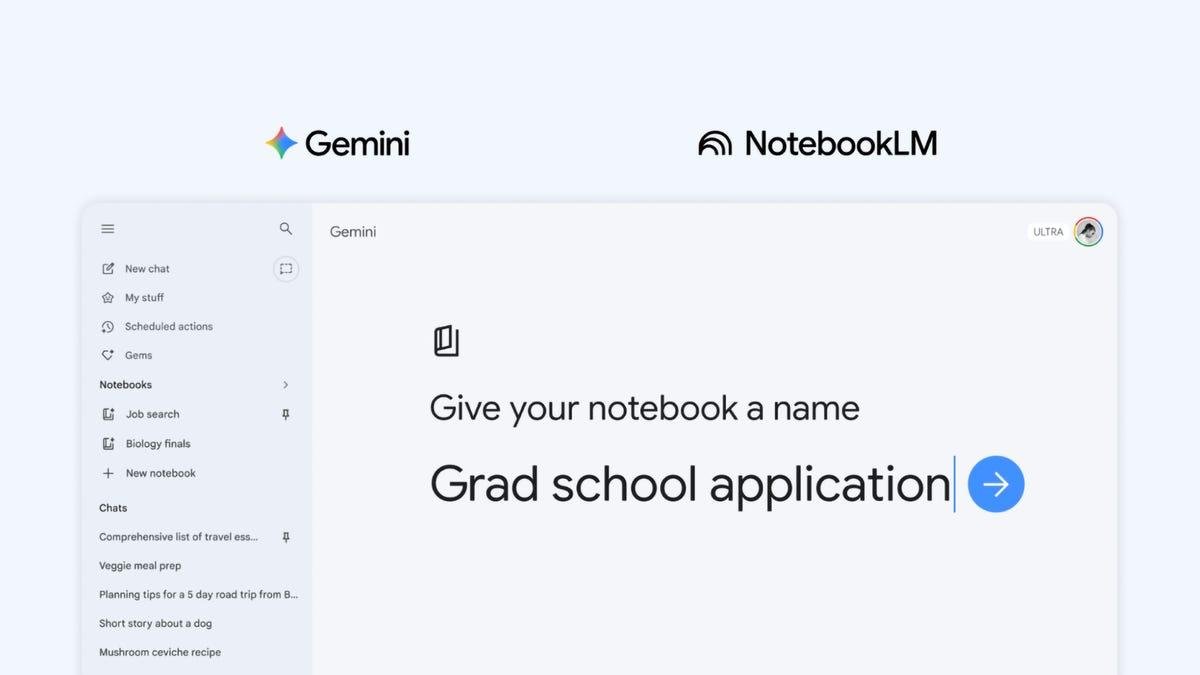
Notebooks make it easier to keep all the information on a particular subject in one place and give Gemini everything it needs without having to manually add details all over again. Now, that integration goes even further, and you can create notebooks directly in Gemini.
Notebooks can be synchronized between Gemini and NotebookLM, making the data in one tool instantly available in the other. This means you can add artifacts to the notebook in Gemini and immediately have the option to create a Video Overview, Infographic or other outputs within NotebookLM. Having the same synced notebook in both tools allows you to use each tool in its own way with the same database.
When the feature is available, you'll see a new notebooks section in the side menu bar of Gemini, allowing you to quickly create one or access others you've made in the past.
Google is rolling out Notebooks in Gemini to AI Ultra, Pro and Plus plans on the web, and will expand access to mobile, more countries across Europe and free users in the coming weeks.