Apple is leveraging AI to boost its accessibility features.
The company shared a handful of updates on Tuesday designed to make its products more helpful for people with a range of disabilities. Apple Intelligence, the tech giant's suite of AI features, powers some of these new capabilities. The unveiling comes ahead of Global Accessibility Awareness Day on Thursday, which aims to bolster digital access and inclusion.
The updates are arriving for features like VoiceOver, Magnifier and video subtitles later this year. They come as more companies -- from Google to Microsoft to Amazon -- are harnessing AI to make their products and platforms accessible to a wider range of people. Many of Apple's updates build upon features it announced last year. They also come ahead of the company's Worldwide Developers Conference, which is scheduled for June 8 and is expected to usher in more AI updates.
VoiceOver and Magnifier support more detailed descriptions
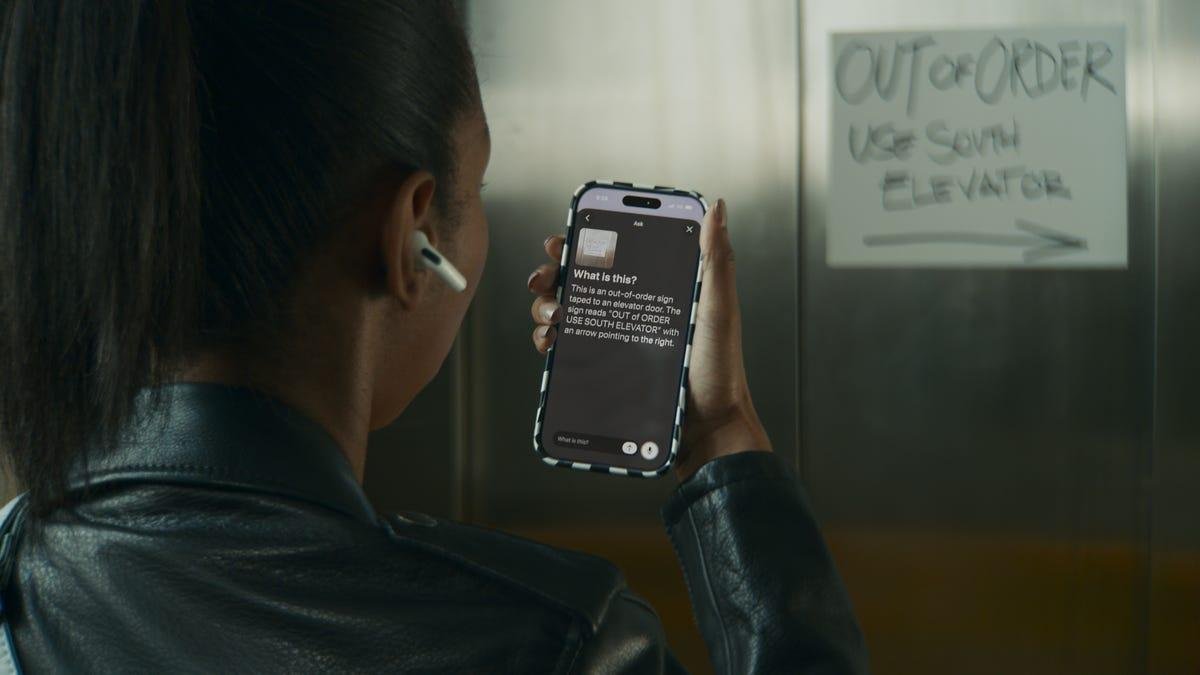
Apple's VoiceOver and Magnifier features can describe on-screen information or real-world settings, and Apple Intelligence is pushing each to be more helpful.
VoiceOver is a screen reader that speaks aloud what's on your screen, and it can help people who are blind or have low vision navigate their device. Image Explorer in VoiceOver will now give more detailed descriptions of what's in objects like photographs, scanned bills and personal records.
And as part of an update to Live Recognition, you can use your iPhone's Action button to quickly gather more information about your surroundings. Just point the camera at what you want to learn more about and ask follow-up questions for additional details.
Magnifier can share more detailed information about what's on your screen and answer follow-up questions.
AppleMagnifier allows people who are low vision to zoom in, view high-contrast text and detect objects around them on an iPhone, iPad or Mac. Now, you can ask questions about what your camera is seeing. For instance, you can point your phone at a recipe and ask how many servings it yields or how long to bake for, and it'll find and share that information using large, high-contrast text.
Voice Control supports natural language
Apple Intelligence will also support natural language using Voice Control, which lets you navigate your iPhone or iPad with your voice. That means if you want to click on something, you no longer have to pinpoint the location using a numbered on-screen grid. Instead, you can just say what you want to select, like a specific file name or folder color. You can also tell your device where you want to zoom in by stating which word or image you want to punch in on.
Voice Control with Apple Intelligence will be available in English in the US, Canada, UK and Australia.
Accessibility Reader is more customizable
Apple debuted Accessibility Reader last year on iPhone, iPad, Mac and Vision Pro. It lets you customize text and adjust font, color and spacing, making it easier for some people to read, such as those with low vision or dyslexia.
Now, Accessibility Reader can work on more complex materials like scientific articles, which tend to format text in multiple columns among several images and tables. You can also remove headers and page numbers for a simpler interface and generate summaries for a quick overview before diving in. Plus, you can translate the text into your ideal language.
Subtitles come to more videos
Closed captioning may be nearly ubiquitous in TV programming and movies, but it isn't as common in some media like personal videos. Now, generated subtitles automatically display transcriptions of spoken audio when captions or subtitles aren't already available. That includes videos recorded from an iPhone, sent by friends and family or streamed online.
On-device speech recognition generates the subtitles privately. They'll appear in non-captioned videos on iPhone, iPad, Mac, Apple TV and Vision Pro. You can customize elements like font and text background in the video playback menu or in settings. Generated subtitles will be available in English in the US and Canada.
People will be able to control their power wheelchair using eye gaze on the Vision Pro.
AppleApple Vision Pro adds a new wheelchair control feature
A new eye-tracking feature on Vision Pro allows people to control their power wheelchair -- no joystick required. They can use eye gaze to select controls and determine how and where their wheelchair moves. This can be especially helpful for people with limited mobility.
Eye tracking on Vision Pro doesn't require regular calibration and can work in a variety of lighting conditions, according to Apple. The feature will be compatible with Tolt Technologies and Luci alternative drive systems in the US, with support for both Bluetooth and wired accessory connections. Apple says it'll work with developers to expand access to more wheelchairs.
"Over the past decade, we've seen eye-driven wheelchair systems evolve in incredible ways," Blair Casey, CEO of Team Gleason, said in a statement. "Leveraging Apple Vision Pro's eye-tracking capabilities in this way is a huge step forward. Team Gleason is proud to support this initiative and excited to see the benefits it can bring to people who use power wheelchairs."
The Hikawa Grip and Stand for iPhone will be more widely available.
Apple/ Zooey Liao/ CNETWider availability of Hikawa Grip and Stand for iPhone
Apple debuted the Hikawa Phone Grip and Stand late last year for the iPhone. It's an adaptive, ergonomic accessory that was designed using input from people with a range of disabilities, including ones affecting dexterity, grip and hand control. Now, as part of a collaboration between Hikawa and PopSockets, the accessory is on sale globally for the first time, and in three new colors. It's available starting today on Apple's website.