
Lenovo IdeaPad Slim 5x Gen 11
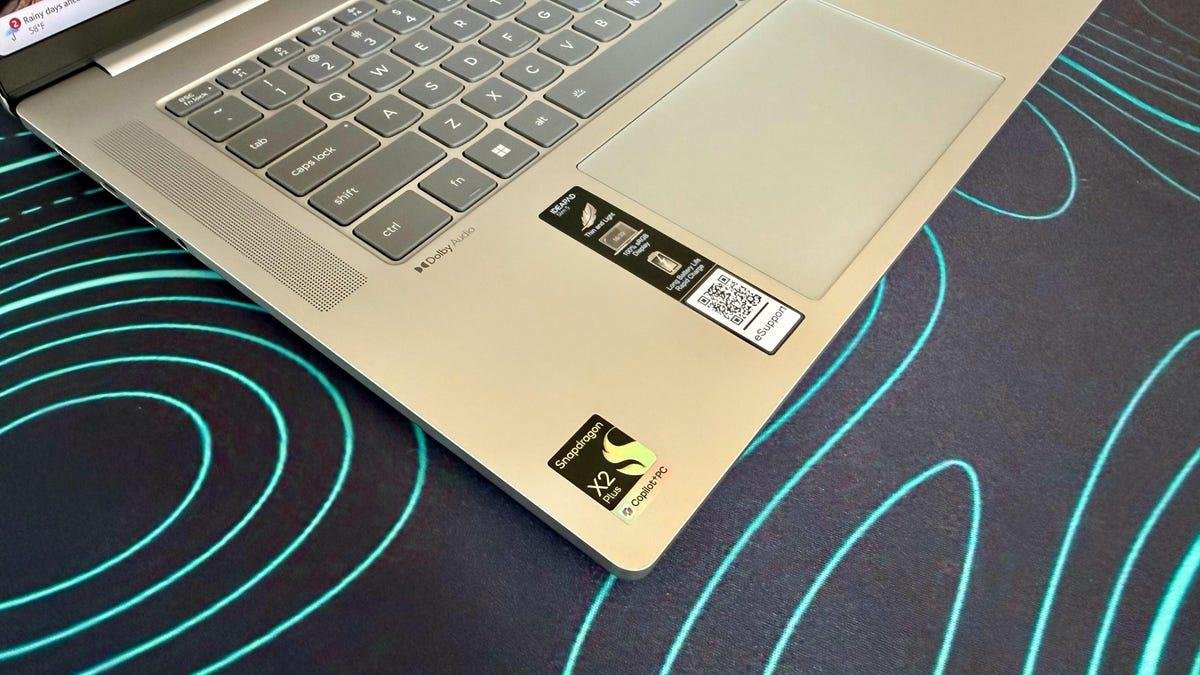
The Lenovo IdeaPad Slim 5x is a budget-friendly, 15-inch Copilot Plus PC built on the Qualcomm Snapdragon X2 platform. It's a machine aimed squarely at people who want long battery life, whisper-quiet operation and dependable everyday performance in a slender chassis. To hit its sub-$1,000 price, the IdeaPad Slim 5x features Qualcomm's entry-level Snapdragon X2 Plus chip and the minimum 16GB of RAM needed to meet Microsoft's definition of a Copilot Plus PC.
For a budget laptop, the IdeaPad Slim 5x does a lot right. It's a practical offering for a standard day at the office, including browsing, email, streaming and light productivity, and its Arm-based design helps keep it efficient and cool. What keeps it from being an easy recommendation for everyone is the same thing that holds back most Windows-on-Arm laptops: software compatibility remains a real consideration, at least in some specific use cases. And gaming performance is average at best from the integrated Qualcomm Adreno GPU.
The 15.3-inch display makes the IdeaPad Slim 5x a bit of a tweener, sandwiched between more commonplace 14- and 16-inch laptops. The Acer Aspire 16 AI offers a roomier 16-inch panel at a lower price and only a slightly heavier weight, and the HP OmniBook 5 14 is more compact and portable with its 14-inch display but offers even longer battery life. This trio of budget laptops features Snapdragon X series processors, but the IdeaPad Slim 5x has the advantage of being the newest of the three, and its Snapdragon X2 chip outpaces both the two older X1 machines.
Lenovo IdeaPad Slim 5x Gen 11
| Price as reviewed | $850 |
|---|---|
| Display size/resolution | 15.3-inch 1,920x1,200 120Hz touchscreen IPS LCD |
| CPU | Snapdragon X2 Plus X2P-42-100 |
| Memory | 16GB LPDDR5X-9523 |
| Graphics | Qualcomm Adreno X2-45 |
| Storage | 512GB SSD |
| Ports | 2 x USB-C (10Gbps), 2 x USB-A (10Gbps), HDMI 2.1, microSD card slot, combo audio |
| Networking | Wi-Fi 7 and Bluetooh 5.4 |
| Operating system | Windows 11 Home Arm64 |
| Weight | 3.1 pounds (1.4 kg) |
The IdeaPad Slim 5x falls roughly in the middle of Lenovo's broader IdeaPad lineup, which includes options with AMD and Intel processors, as well as the 3x and 7x Snapdragon X-based series, sized between 14 and 16 inches. Some of the 7x SKUs include the more advanced Snapdragon X2 Elite rather than the X2 Plus, which this model is built around.
The IdeaPad Slim 5x starts at $850 at Lenovo. We tested this entry-level model, but Lenovo offers a handful of upgrades. You can double the RAM to 32GB for an eye-watering $290 (thanks, RAMageddon) and bump the storage up from 512GB to 1TB for an also hefty $150.
Two other upgrades are much more attainable, and we recommend both. It costs only $30 to swap out the basic 1,920x1,20-pixel, 120Hz IPS display for a 2.5K (2,560x1,600), 165Hz OLED panel. That's a no-brainer for the added pixels alone, to say nothing about the better contrast and faster refresh rate, unless you require a touchscreen. The IPS offers touch support; the OLED doesn't. You can also outfit the laptop with a bigger battery, going from a 54.7-watt-hour unit to 70 watt hours for just $10. The IdeaPad Slim 5x we tested offers great battery life, but more is always better.
The Lenovo IdeaPad Slim 5x starts at £1,310 in the UK and AU$1,699 in Australia.
Lenovo IdeaPad Slim 5x performance
The processor at the heart of the IdeaPad Slim 5x, the Snapdragon X2 Plus X2P-42-100, is clearly tuned for efficiency first. That said, it manages to feel snappy in the ways that matter most for a mainstream productivity laptop. Apps open promptly, multitasking is smooth with 16GB of memory, and the machine feels comfortable handling a standard mix of browser tabs, Office work and streaming. It performed quite well against comparable machines in our benchmarks, and it should satisfy anyone looking for a reliable office notebook.
Its limitations show up when you push beyond that. The Adreno X2-45 integrated graphics are fine for light creative work, but this is not the laptop for serious gaming or any sustained graphics-heavy workloads.
Qualcomm leads the way with laptop battery life, and the IdeaPad Slim 5x continues its run of success. The IdeaPad Slim 5x lasted 20.5 hours on our online streaming battery drain test, which was a half an hour shorter than the Acer Aspire 16 AI and nearly eight hours shorter than the HP OmniBook 5 14, but much longer than similarly priced laptops such as the Intel-based Lenovo IdeaPad 5i 16 and AMD-based Dell 14 Plus 2-in-1.
Another important note here: While Windows-on-Arm has made vast strides in terms of software compatibility, there are still issues. I was unable to get my VPN client to function on the IdeaPad Slim 5x, for instance, which has been an issue on other Arm machines, likely because of driver problems. I also couldn't run Valorant, because its kernel-level anti-cheat system, Riot Vanguard, is incompatible with Arm architecture. You can check the apps you use to see if they have native Arm versions with this Window-on-Arm compatibility tool.
Practical, not premium design
The IdeaPad Slim 5x keeps the design language simple and practical, which suits the price. It's solid enough for daily use, though nothing about it stands out as especially premium. While it's fairly lightweight for its size at just over 3 pounds, it's not featherlight or ultra-slim like some other ultraportables. It sits in the middle of the 14-inch HP OmniBook 3 14 (2.85 pounds) and the 16-inch Acer Aspire 16 AI (3.45 pounds) in size and weight.
The 15-inch chassis gives the keyboard enough room to avoid feeling cramped, and it feels responsive for a chiclet-style, low-profile deck. The touchpad is generously proportioned and precise, though not luxurious in the way that glass alternatives feel.
For an IPS panel, the display is one of the strongest parts of this configuration. It delivers a bright, color-accurate picture and is what I'd call a "workmanlike" panel that reflects the price. I liked getting touch support at this price and the anti-glare finish that keeps glare and reflections away. Lab testing with a Spyder X Elite colorimeter showed a peak of 432 nits of brightness, which is very respectable for a budget laptop. Color performance was also solid, with full sRGB coverage and measured results of 77% AdobeRGB and 78% P3. It's suitable for everyday photo work and media consumption, though it won't rival a creator-grade panel.
Sound quality is something of an issue. The two 2-watt speakers sounded distractingly tinny at times, especially when the treble was peaking, and the volume was underwhelming. The FHD webcam also didn't blow me away. It looked a bit grainy when video was full-screened, and didn't hold up to fast motion particularly well.
The port allotment is relatively generous with two USB-C, two USB-A and an HDMI port along with a microSD card slot, but the USB-C ports are disappointingly slow. They are of the USB 3.2 Gen 2 variety, which offers just 10Gbps speed compared with the 40Gbps you'd get from Thunderbolt 4.
Should I buy theLenovo IdeaPad Slim 5x?
The Lenovo IdeaPad Slim 5x offers solid value for students or office workers looking for a portable, dependable daily driver. It's wholly unobtrusive, in both the positive and negative sense, but it's a good fit for those looking for a productivity machine and want to spend significantly less than $1,000.
The problem with the IdeaPad Slim 5x, insofar as there is one, is that it's a middling package overall. While the lows aren't cripplingly low, the highs aren't particularly high. It's got a strong battery, but not the best-in-class. The highlight is the bright, responsive touchscreen, and brighter still is the option to upgrade to a higher-res OLED panel (albeit without touch support) for only an extra $30.
The review process for laptops, desktops, tablets and other computerlike devices consists of two parts: performance testing under controlled conditions in the CNET Labs and extensive hands-on use by our expert reviewers. This includes evaluating a device's aesthetics, ergonomics and features. A final review verdict is a combination of both objective and subjective judgments.
The list of benchmarking software we use changes over time as the devices we test evolve. The most important core tests we're currently running on every compatible computer include Primate Labs Geekbench 6, Cinebench 2024, PCMark 10 and 3DMark Fire Strike Ultra.
A more detailed description of each benchmark and how we use it can be found on our How We Test Computers page.
Geekbench 6 CPU (multi-core)
Lenovo IdeaPad Slim 5x Gen 11 12268HP OmniBook 5 14 11379Dell 14 Plus 2-in-1 10554Acer Aspire 16 AI 10521Lenovo IdeaPad 5i 16 2-in-1 Gen 10 10388MacBook Neo 8958
Geekbench 6 CPU (single-core)
MacBook Neo 3541Lenovo IdeaPad Slim 5x Gen 11 3302Dell 14 Plus 2-in-1 2792Lenovo IdeaPad 5i 16 2-in-1 Gen 10 2645HP OmniBook 5 14 2395Acer Aspire 16 AI 2139
Cinebench 2024 CPU (multi-core)
Lenovo IdeaPad Slim 5x Gen 11 702Acer Aspire 16 AI 677HP OmniBook 5 14 675Dell 14 Plus 2-in-1 537Lenovo IdeaPad 5i 16 2-in-1 Gen 10 530MacBook Neo 333
Cinebench 2024 CPU (single-core)
MacBook Neo 143Lenovo IdeaPad Slim 5x Gen 11 133Dell 14 Plus 2-in-1 111HP OmniBook 5 14 110Lenovo IdeaPad 5i 16 2-in-1 Gen 10 109Acer Aspire 16 AI 96
3DMark Steel Nomad
Lenovo IdeaPad Slim 5x Gen 11 413Lenovo IdeaPad 5i 16 2-in-1 Gen 10 380MacBook Neo 367HP OmniBook 5 14 228Acer Aspire 16 AI 227Dell 14 Plus 2-in-1 220
Online streaming battery drain test
HP OmniBook 5 14 28 hr, 19 minAcer Aspire 16 AI 21 hr, 9 minLenovo IdeaPad Slim 5x Gen 11 20 hr, 37 minDell 14 Plus 2-in-1 14 hr, 55 minMacBook Neo 13 hr, 26 minLenovo IdeaPad 5i 16 2-in-1 Gen 10 12 hr, 30 min
System configurations
| Lenovo IdeaPad Slim 5x Gen 11 | Microsoft Windows 11 Home; Qualcomm Snapdragon X2 Plus X2P-42-100; 16GB DDR5 RAM; Qualcomm Adreno Graphics; 512GB SSD |
|---|---|
| HP OmniBook 5 14 | Microsoft Windows 11 Home; Qualcomm Snapdragon X Plus X1P-42-100; 32GB DDR5 RAM; Qualcomm Adreno Graphics; 1TB SSD |
| Acer Aspire 16 AI | Microsoft Windows 11 Home; Qualcomm Snapdragon X X1-26-100; 16GB DDR5 RAM; Qualcomm Adreno X1-45; 512GB SSD |
| Lenovo IdeaPad 5i 16 2-in-1 Gen 10 | Microsoft Windows 11 Home; Intel Core Ultra 7 255U; 16GB DDR5 RAM; Intel Graphics; 1TB SSD |
| Dell 14 Plus 2-in-1 | Microsoft Windows 11 Home; AMD Ryzen AI 5 340; 16GB DDR5 RAM; AMD Radeon 840M Graphics; 512GB SSD |
| MacBook Neo | Apple MacOS Tahoe 26.3.1; Apple A18 Pro (6‑core CPU, 5‑core GPU); 8GB LPDDR5; 256GB SSD |