Staying cool in the summer isn't only the job of your air conditioner -- a good tower fan goes a long way to improving your comfort while helping circulate cool air from your AC more effectively. Tower fans can even provide effective cooling in milder weather, allowing you to save energy by turning up the thermostat or skipping the AC entirely. Their tall, slim form factor makes them suitable for most rooms without taking up valuable space -- some models even come with smart features.
Pros
- Excellent user experience for the price
- Excellent airflow
- Reasonably quiet on most speeds
- Great energy efficiency
- Adjustable oscillation range
Cons
- Moderately clicky remote
- No mesh screen filter
- Oscillation hums on lower settings
- Good air texture, but could be better
Pros
- Most efficient fan on this list
- Panoramic oscillation, horizontal and vertical
- Exceptional quietness
- Great for small spaces
- 5-year warranty
Cons
- Confusing display
- Average airflow
- Hum, wobble and slight whine spoil otherwise excellent white noise
- Requires a screwdriver to assemble
Pros
- Outstanding energy efficiency
- Outstanding air texture
- Adjustable louvers to redirect airflow
- Excellent white noise profile
- Great smart home features
Cons
- Odd remote control storage slot
- Above-average price
- Average airflow
Pros
- Unmatched, powerful airflow
- Comfortable indoor misting function that doubles as a humidifier
- Outstanding white noise
- Persistent mute
- Smart home controls
Cons
- The loudest tower fan on our list
- Very heavy, almost 18 pounds
- Relatively expensive
- Moderate energy efficiency
Pros
- Affordable for a bladeless fan
- Outstanding air texture
- Extremely quiet
- Silent, strongly magnetic remote
- Excellent oscillation options
Cons
- Expensive, compared with most tower fans
- No smart home controls
- Low airflow
- Loses some energy efficiency at higher settings
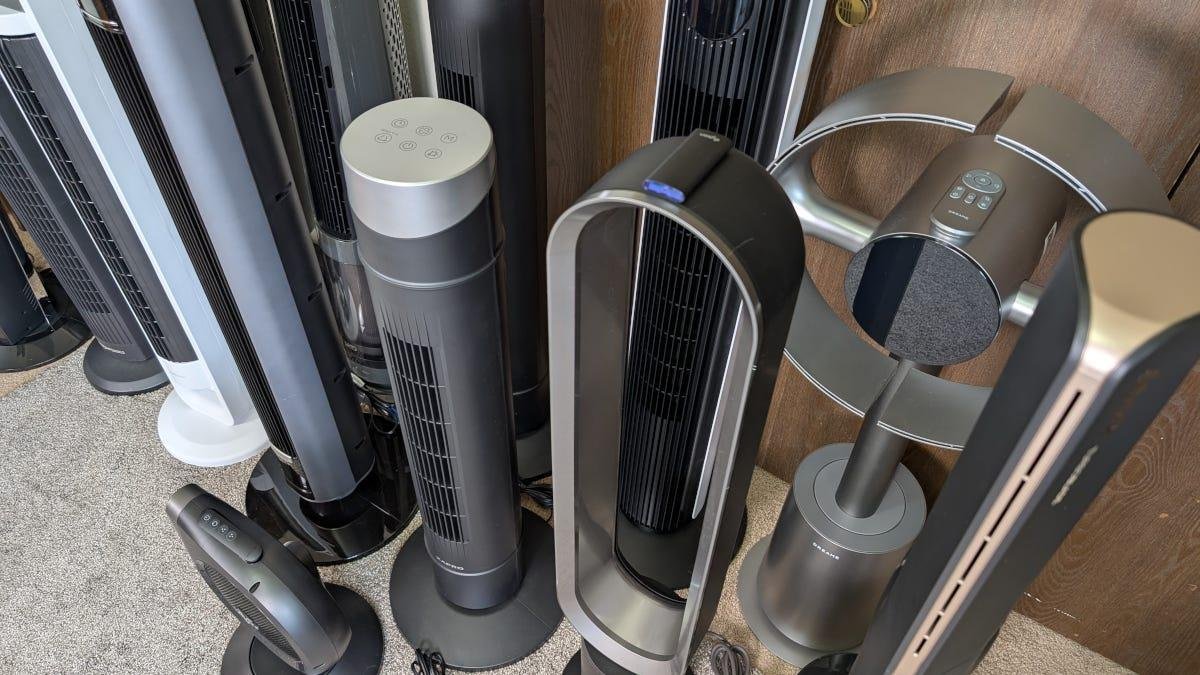
Tower fans seem deceptively simple, but they're a surprisingly complex balance of airflow, air texture, loudness, sound quality, energy efficiency and convenient features. I dug deep into 14 of the latest tower fan models to see which has the best balance of these attributes through rigorous testing. While my testing is far from lab-controlled conditions, I used an anemometer to measure airflow, a sound meter and energy-tracking smart plugs, along with some help from my own senses, to explore what makes an outstanding tower fan.
What is the best tower fan?
We tested fans for power, energy efficiency, features and noise.
John Carlsen/CNETMy top pick for the best overall tower fan is the Zafro Smart Tower Fan 36, which balances airflow, air texture, loudness, white noise, energy efficiency and excellent features exceptionally well -- and for a very competitive price. It's not the most powerful or quietest model out there, but it's near the top of the class in almost every way.
Best tower fans
Pros
- Excellent user experience for the price
- Excellent airflow
- Reasonably quiet on most speeds
- Great energy efficiency
- Adjustable oscillation range
Cons
- Moderately clicky remote
- No mesh screen filter
- Oscillation hums on lower settings
- Good air texture, but could be better
Why I like it:
When I began my research, I knew nothing about Zafro, so it was a pleasant surprise to see it perform so consistently well, despite not being as powerful, quiet or energy efficient as rival tower fans. This makes it the ideal tower fan for this list because it doesn't seem to sacrifice any particular feature to make another one better. For example, it has respectable airflow, ranking fifth out of the 14 fans I tested in terms of median airflow and fourth most powerful overall. This means it's more than capable of moving air within a room.
I also appreciate the thoughtful design, including one of the very few adjustable oscillation ranges in the lineup -- from as little as 30 degrees to 120 degrees in 30-degree increments -- which acknowledges that not everyone wants a typical 90-degree oscillation range. And other than the massive asterisk that is OmniBreeze, Zafro 36 stands alongside the Dreo 554S as the most affordable smart tower fan on the market.
Who is this for:
Zafro 36 is a great all-rounder for people who want a rich set of features, including smart home controls, without busting their budgets. At $90, it's pricier than non-smart tower fans, but not by so much that it feels excessive.
Who shouldn’t buy it:
The reasons why you wouldn't want Zafro 36 mostly stem from its not dominating any testing categories. For example, it has good air quality and white noise, but it doesn't deliver them as well as the Levoit Classic 42-Inch. Likewise, it lacks the mesh-screen filter that makes the Shark TurboBlade and OmniBreeze Wi-Fi much easier to maintain. Plus, it's nowhere near as compact and affordable as the Vornado Strata 8 Omni. Additionally, its one-year warranty is rather anemic compared to most rivals.
Pros
- Most efficient fan on this list
- Panoramic oscillation, horizontal and vertical
- Exceptional quietness
- Great for small spaces
- 5-year warranty
Cons
- Confusing display
- Average airflow
- Hum, wobble and slight whine spoil otherwise excellent white noise
- Requires a screwdriver to assemble
Why I like it:
The Vornado Strata 8 Omni's compact design doesn't scream "tower fan," but its 180-degree adjustable panoramic oscillation -- with a vertical mode -- makes it just as suitable for the floor as a table. Having this level of flexibility is key to the Strata 8 Omni's position as my budget pick. The small size also means you're getting impressive energy efficiency for the airflow. For example, Vornado Strata produced a median airflow of 335 feet per minute, the same as Midea Detachable, while using a fraction as much energy -- only 13 watts on high.
In terms of quietness, only the Shark TurboBlade comes close to matching the Vornado Strata 8 Omni, with the former slightly quieter at low speeds and the latter at maximum power. Vornado also has an unmatched five-year warranty, placing it far ahead of the two-year coverage offered by Dyson, Dreame, Lasko, Levoit, Midea and Shark.
Who is this for:
You might want the Vornado Strata 8 Omni if you live in a small home or tiny house. It's easy to store and fits almost anywhere you need it. It also has an outstanding air texture that feels great in small rooms. $75 is a fantastic price for this kind of performance.
Who shouldn’t buy it:
I still haven't mastered the panoramic oscillation controls or the on-device display, which uses a system of numbered codes to indicate which oscillation mode is active. I'm sure I'll figure it out given enough time. The airflow for this unit isn't low by any means, but you should expect it to be as powerful as something like Dreo and Zafro.
There are a few minor quirks that detract from the white noise -- a wobble and slight whine -- but nothing annoying. Lastly, you'll need a screwdriver for assembly, as the base doesn't attach with a simple locking system like other brands. And unlike the Dreame MF10, which also requires a screwdriver, it doesn't include one in the package. You could say this is a win for reducing potential waste, but it slows setup time.
Pros
- Outstanding energy efficiency
- Outstanding air texture
- Adjustable louvers to redirect airflow
- Excellent white noise profile
- Great smart home features
Cons
- Odd remote control storage slot
- Above-average price
- Average airflow
Why I like it:
Levoit is a frequent top contender in many product comparisons, so unsurprisingly, the brand makes a strong showing here with the Levoit Classic 42-Inch smart tower fan. It's second only to the Vornado Strata in terms of energy efficiency, sipping between 2 watts and 19 watts. I'm also a huge fan of its air texture -- it's the only traditional tower fan that earned a perfect score and felt as good as bladeless models from Dyson, Dreame and Shark.
While it lacks vertical oscillation, I appreciate Levoit's inclusion of adjustable louvers that you can use to direct air circulation up or down, achieving a similar effect to Shark TurboBlade's, albeit less extreme. I love the whooshing sound of Levoit's white noise on the highest speed, and its low-speed hum isn't distracting enough to dislike.
Who is this for:
The Levoit Classic 42-Inch is every bit as capable as the Zafro and the Vornado Strata, and has the best app and smart home controls in this comparison. It's a little pricier than average -- $130 -- but worth the investment for most people.
Who shouldn’t buy it:
Although I found no major issues with this fan's lower airflow relative to Dreo, Zafro and OmniBreeze, it may not work for people who want raw power. My biggest complaint is that the remote slot on the back of the machine is a little finicky, and you have to remove the remote to access the fan's carrying handle.
Pros
- Unmatched, powerful airflow
- Comfortable indoor misting function that doubles as a humidifier
- Outstanding white noise
- Persistent mute
- Smart home controls
Cons
- The loudest tower fan on our list
- Very heavy, almost 18 pounds
- Relatively expensive
- Moderate energy efficiency
Why I like it:
The Dreo TurboCool Misting Fan 765S exceeded every expectation I had from its name -- it was the only tower fan to surpass the 1,000 FPM barrier during max-speed testing. Only another Dreo fan even came close, the 554S, but still lagged. Dreo's decision to integrate ultrasonic misting tech also gives the 765S a real cooling advantage over other indoor tower fans, bringing evaporative cooling into the equation rather than relying solely on airflow. The misting tech doubles as a humidifier and shouldn't make any surfaces wet unless you place objects closer than the recommended 5-foot distance.
Dreo TurboCool leverages the unit's inherent loudness and high airflow to create some of the most satisfying white noise in a tower fan. But the brand also has a persistent mute setting that remembers to turn off interface sounds until you want them back.
Who is this for:
If you want powerful cooling with a side of humidification, then the Dreo TurboCool Misting Fan 765S is unbeatable, especially in bigger spaces. Still, at $200, it's more expensive than most tower fans, which is normally the realm of bladeless tower fans like the Dyson Cool and Dreame MF10.
Who shouldn’t buy it:
High airflow comes with a significant downside: loudness. Dreo TurboCool registered a maximum of 59 dBa during testing, about 8 decibels louder than the quietest fans, such as the Vornado Strata and Amazon Basics. Due to the logarithmic nature of sound measurement, it's much louder than it seems on paper. Still, 59 dBa isn't dangerous or overly disruptive, but you'll need to use a lower speed for the Dreo TurboCool to be quiet enough for sleeping.
The misting tech also presents challenges, including increased weight (to prevent tipping) and more frequent cleaning. While not the worst offender in fan-only mode, the TurboCool uses a fair amount of electricity and certainly uses extra when misting is active.
Pros
- Affordable for a bladeless fan
- Outstanding air texture
- Extremely quiet
- Silent, strongly magnetic remote
- Excellent oscillation options
Cons
- Expensive, compared with most tower fans
- No smart home controls
- Low airflow
- Loses some energy efficiency at higher settings
Why I like it:
Shark TurboBlade proves that you don't need to spend $400 on Dyson Cool to get an outstanding, sleek bladeless fan. Like all of the bladeless models on this list, the Shark TurboBlade has such a pleasant, smooth air texture and good white noise. It's also one of the quietest tower fans I tested, topping out at a relatively low 53 dBa, though not as quiet as Vornado Strata's 51 dBa. However, the 39 dBa noise level on medium speeds is the quietest in that category. It's also one of the few models with a mesh filter screen to reduce dust and keep cleaning simple.
The TurboBlade has my favorite remote-control storage option: a relatively strong magnet that keeps the remote easily accessible on top of the central column, so it's not in danger of falling off when you move the fan to another location. While not as versatile as the automatic dual-oscillation on Dreame MF10, Shark's ability to rotate the tower sideways -- as well as each side blade -- and adjust the height offers a huge amount of flexibility. Like with Zafro and Vornado Strata, you can adjust Shark's oscillation range.
Who is this for:
Bladeless tower fans like the $200 Shark TurboBlade are at the upper end of the price range compared with most fans, so they're not budget-friendly. Still, it's a great option if you want an excellent air texture and modern design.
Who shouldn’t buy it:
None of the bladeless tower fans were particularly powerful in terms of airflow, and Shark's energy efficiency dips drastically at higher speeds. Shark also lacks smart home features.
Pros
- Outstanding value
- Smart home controls
- Excellent airflow
- Removable mesh filter screen
Cons
- Seasonal Costco exclusive
- Relatively loud with a whiny white noise profile
- No persistent mute setting
- Relatively high energy usage
- Poor air texture
Why I like it:
The OmniBreeze Wi-Fi is a unicorn among tower fans. It packs in almost every modern feature you can imagine, like smart home controls, a mesh filter screen, and reasonably powerful airflow. Better yet, it does this for $40, nearly half the price of Vornado Strata and Lasko WhisperForce, and only $10 more than the bare-bones Amazon Basics 28".
More than half of the tower fans on this list have smart home capabilities, but they tend to cost $100 or more on average. For comparison, you can buy the OmniBreeze for $50 less than the next-cheapest smart tower fans from Dreo and Zafro -- making its $40 price less than half as much. While the reasonably affordable Lasko WhisperForce has a mesh screen filter, it's more difficult to remove for cleaning, but the only other filters on this list are available on pricey bladeless fans from Dreame and Shark. In terms of power, the OmniBreeze ranked fourth overall. Only the Dreo models and the Zafro 42 surpassed it.
Who is this for:
While OmniBreeze Wi-Fi makes a few trade-offs to achieve its low price, I'm happy to look the other way on most of them -- and none are particularly egregious. The best value for anyone looking to save cash on a great tower fan.
Who shouldn’t buy it:
The downsides of the OmniBreeze Wi-Fi are many. Perhaps the biggest is that you need a Costco membership to buy one. (It may be available elsewhere, but Costco is the most consistent and affordable.) Costco exclusivity also means you're less likely to find it in stock during the off-season, like the competition. Additionally, the fan is fairly whiny at any speed, but especially when oscillating. This is because it uses internal oscillation: it's the only fan in our lineup where part of the body rotates instead of the whole thing. It's one of the loudest fans on low and medium speeds, but both Dreo units I tested are still louder.
Speaking of loud, the control beeps are a bit obnoxious, and you need to silence them every time you turn the fan on -- it doesn't remember the mute setting once powered off like most tower fans. OmniBreeze Wi-Fi doesn't use as much energy on low as the Vornado OSCR37 AE, but it's still the second least-efficient tower fan I tested. It's tied with Dyson Cool and Vornado OSCR37 AE for the most power-hungry on its highest setting. Lastly, the air texture isn't great -- it feels very turbulent compared to other fans, only the Amazon Basics 28" felt worse.
- Amazon Basics 28: At $36, this is the most affordable tower fan in our comparison. It's also the only model without a remote control -- just a simple three-speed dial and oscillation button. The mechanical dial is the biggest advantage of the Amazon Basics 28" because it's always compatible with smart plugs, whereas many tower fans with digital controls aren't. Still, it doesn't match the flexibility of a smart tower fan like Levoit or Zafro.
- Dreame Bladeless Fan MF10: Dreame may have a more traditional pedestal fan profile, but it is a great counterpoint to other pricey bladeless fans from Dyson and Shark. Where it excels is the depth of its features: smart home controls, optional air filtration and dual-oscillation. The dual-oscillation is particularly noteworthy because its two GyroWing air circulators can pivot in opposite directions, offering greater coverage than any other fan. Considering its smart features, Dreame's typical $200 price is very competitive with non-smart bladeless fans from Shark and Dyson.
- Dreo Smart Tower Fan 554S: The $90 554S delivers performance similar to the Dreo TurboCool, ranking sixth overall. This makes it a suitable alternative if you don't want to pay extra for TurboCool's misting feature, which will save roughly $90. It's also far more energy-efficient at higher speeds, using just 25 watts compared to TurboCool's 40 watts. It also boasts an adjustable height, giving it more vertical reach than most tower fans, except models with vertical oscillation (Vornado Strata and Dreame MF10) or adjustable louvers (Levoit).
- Dyson Cool AM07: Dyson Cool is an exceptional bladeless fan, but its simple features and $400 price hold it back from being my bladeless pick -- that's roughly twice as much as the Shark and Dreame models. However, like all bladeless fans I tested, the air texture is unmatched, and I love the white noise this Dyson tower fan produces.
- Lasko WhisperForce: Lasko costs a respectable $76, making it one of the more affordable options on this list. WhisperForce is an apt name, as it was one of the few fans I couldn't hear on the loudest speed. It's reasonably quiet at higher speeds but lags behind most competitors in airflow. Still, I enjoyed the air texture and good energy efficiency of this Lasko fan. It's a good budget option for folks who want something a bit nicer than OmniBreeze and Amazon Basics -- even if it costs $30 to $40 more.
- Midea Detachable: There are quite a few unique designs on this list, but Midea's detachable fan assembly is easily the most practical of the group. For one, detaching the top means you can wash it under a hose rather than relying on a vacuum or a damp rag. But you also have more storage flexibility for keeping the fan in a cabinet or a small closet. However, its airflow, sound profile and energy use are all unremarkable compared to my top picks -- and the fan's lack of a mute function is its biggest drawback.
- Vornado OSCR37 AE: I like the simple, quiet remote control, attractive design and good loudness of the Vornado OSCR37, but it didn't live up to performance expectations in testing. For example, it used more energy at low settings than many competitors did at their highest settings. Likewise, its white noise is only passable.
- Zafro Smart Tower Fan 42: The Zafro 42 is a good tower fan that performed well in my tests, but aside from a slight boost in power over the Zafro 36, it's functionally identical in every way. I recommend it only if you really want a larger size or if the Zafro 36 is out of stock. Otherwise, save yourself a few bucks by opting for the Zafro 36.
Tower fans compared
| Tower fan | CNET rating | Size | Fan speeds | Oscillation | Max airflow | Type | Price |
|---|---|---|---|---|---|---|---|
| Zafro 36 | 9.1/10 | 36 in. | 12 | 120º | 768 FPM | Standard | $190 |
| Vornado Strata 8 Omni | 9/10 | 14 in. | 10 | 180° (H), 90° (V) | 532 FPM | Compact | $75 |
| Levoit Classic 42-inch | 9/10 | 42 in. | 12 | 90º | 532 FPM | Standard | $130 |
| Dreo TurboCool 765S | 8.7/10 | 44 in. | 12 | 90º | 1,043 FPM | Bladeless | $200 |
| Shark TurboBlade | 8.3/10 | 45 in. | 10 | 180º | 433 FPM | Standard | $200 |
| OmniBreeze Wi-Fi | 8/10 | 38 in. | 5 | 90º* | 728 FPM | Standard | $40 |
| Amazon Basics 28" | 7.7/10 | 28 in. | 3 | 60º | 492 FPM | Compact | $36 |
| Dreame MF10 | 8/10 | 40 in. | 10 | 180° (H), 90° (V) | 394 FPM | Bladeless | $200 |
| Dreo Smart 554S | 8.6/10 | 42 in. | 9 | 90º | 886 FPM | Standard | $90 |
| Dyson Cool AM07 | 8/10 | 40 in. | 10 | 70º | 315 FPM | Bladeless | $400 |
| Lasko WhisperForce | 8.2/10 | 40 in | 12 | 90º | 492 FPM | Standard | $76 |
| Midea Detachable | 8.1/10 | 42 in. | 5 | 70º | 689 FPM | Standard | $89 |
| Vornado OSCR37 AE | 7.9/10 | 37 in. | 4 | 90º* | 748 FPM | Standard | $120 |
| Zafro 42 | 8.9/10 | 42 in. | 12 | 120º | 827 FPM | Standard | $110 |
I tested 14 of the latest tower fan models, most of which arrived as review samples from manufacturers.
John Carlsen/CNETJohn Carlsen/CNET
As I planned my tower fan tests, I thought about why people use fans. For example, airflow, loudness and energy efficiency are immediately obvious criteria, but I considered other ways tower fans can be comfortable. Ultimately, I decided that air texture and sound profiles (white noise and device sounds) were also important.
There are 10 total points possible for each test criterion. Here's how I calculate the product scores:
- Airflow (20%): You'll get the maximum cooling effect with higher airflows -- measured in feet per minute on an anemometer -- because it helps sweat evaporate faster.
- Air texture (15%): How a tower fan feels is a game changer for people who are sensitive to airflow like I am, but my texture test is very subjective because I lack the resources to study whether turbulence is the deciding factor. While I evaluated medium and high speeds, I didn't test the low speed in this category. This is because some of the low speeds were almost imperceptible, like Dyson and Levoit, while faster fans from Amazon Basics and OmniBreeze weren't much different than the medium speeds.
- Loudness (15%): Even if a tower fan sounds nice, being overly loud can grate on the senses, especially when you or a child is trying to sleep. I measured this in decibels (dBa) across low, medium and high speed settings.
- Sound profile (15%): What a fan sounds like in terms of white noise, and the ability to turn off interface sounds greatly enhances the user experience. Evaluating white noise is the subjective half of this test, while the ability to mute and disable device sounds forms the objective half.
- Energy efficiency (15%): The average energy consumption of tower fans, measured in watts, isn't particularly high, but it adds up on your electric bill. This is doubly true when running multiple fans 24/7.
- Price (10%) and features (10%): These round out the remainder of the score, but generally depend on static specifications rather than qualitative testing.
Airflow: Speed
While airflow speed is important in terms of providing an objective comparison point between tower fans, it also affects the air texture, loudness and white noise, so it weighs more heavily than other categories in my scoring.
John CarlsenI previously used an anemometer to test handheld vacuums and car vacuums, but it was difficult to log data over time. (Plus, a particularly powerful vacuum damaged it.) For tower fan testing, I upgraded to an app-enabled anemometer for more automatic logging.
For this test, I used speed in feet per minute instead of volume in cubic feet per minute to keep the test simple enough to leave time for other testing. For example, using cubic feet per minute would triple the test time as I'd need to measure the airflow in more than one place. Likewise, it requires knowing the area of each fan's air outlet, which is more difficult to determine on the narrow outlets of bladeless fans. Using FPM means I have a reasonably balanced comparison between fans of all types and sizes, even if I lose some of the nuance that comes with measuring volume.
My airflow testing uses a simple tunnel -- courtesy of Dreame's massive shipping box -- to isolate airflow between the fan and the anemometer. Initially, I used clear plastic to seal one end around the fan so only the exhaust blew through the tunnel, but it interfered with bladeless fans like the Dyson. So I added a second test with the tunnel unsealed. Because I did two kinds of tunnel tests for low, medium and high speeds, this means a total of six one-minute tests per fan. I tested each speed continuously for one minute, giving enough time between each test for speeds to level out. Across 14 fans, that's over 5,000 second-by-second data points.
Unsealed-tunnel testing: In terms of pure power, the Dreo TurboCool is the undisputed champion. Not only did it produce the highest median speeds in the medium and high categories, but it was the only tower fan with a maximum speed above 1,000 FPM (1,043 FPM). Across the three speeds I tested, it had a median speed of 689 FPM, making it the only fan to surpass 600 FPM.
Zafro 42, Dreo Smart, OmniBreeze and Zafro 36 all produced exceptional airflow above 500 FPM, while the Vornado OSCR37 came in at 492 FPM. None of the other fans came in above 400 FPM, with the Midea, Levoit and Vornado Strata in the 300s. All of the bladeless tower fans produced lower airflow overall than the traditional models. Part of the reason for this is the relatively tiny air outlets on bladeless fans, making measurement more difficult. Dyson and Lasko tied for the lowest median airflow -- 197 FPM.
Sealed-tunnel testing: In general, most of the fans performed worse in the sealed-tunnel test, so it plays almost no role in the scoring. However, Midea (472 FPM median) and Amazon Basics (453 FPM median) performed better when sealed. I suspect these fans handle back pressure more effectively, but it doesn't really affect day-to-day use outside these isolated tests. Lasko and Vornado Strata didn't consistently do well in sealed-tunnel tests, but did better at low and high speeds, respectively.
Airflow: Air texture
When temperatures are mild, I'd argue that how the air feels on your skin at lower speeds is more important than how fast it blows.
John Carlsen/CNETHigh airflow is only part of the equation for an excellent tower fan -- the texture of the airstream matters just as much. Unlike wind speed, my texture test is purely subjective -- it's simply how consistently I enjoyed the breeze from a tower fan at medium and high speeds.
Although the bladeless tower fans from Dyson, Dreame and Shark didn't perform as well in terms of raw power, they produced the most comfortable air textures at medium and high speeds -- 10 out of 10. The Vornado Strata 8 Omni and Levoit Classic also earned perfect texture scores on both settings. While Dreo TurboCool earned 9 out of 10 in both categories, it achieves a 10 when the misting function is active. Lasko WhisperForce earned a perfect texture score at medium speed, though its max speed was slightly more turbulent.
This isn't to say the other fans were uncomfortable, as Midea and Zafro generally felt nice, while Dreo Smart and Vornado OSCR37 lost some charm at top speed. However, the wind from OmniBreeze and Amazon Basics -- the only fans under $40 -- was only passable.
Sound profile: Loudness
In terms of volume, none of the tower fans surpassed 60 dBa on the highest speed setting, meaning they're unlikely to drown out a
I used my trusty sound meter to measure the loudness of each fan from 39 inches away (1 meter). While this is a good distance for testing, most people place fans farther away, so your experience will likely be quieter than these results. I reduced noise as much as possible in my home office for this test, which meant leaving the AC off on a hot day and taking occasional breaks to cool the room as the indoor temperature reached into the 80s.
On low speeds, most of the fans weren't loud enough for the sound meter to register a result -- it can't measure below 30 dBa. However, Midea (39 dBa), OmniBreeze (41 dBa) and Amazon Basics (42 dBa) were more audible, but not all that loud.
The standouts during medium-speed tests were Shark (39 dBa), Vornado Strata (41 dBa) and Levoit (42 dBa), because they were equal to or better than the worst performers in the low-speed test. OmniBreeze was the loudest in this test, producing 54 dBa, while Dreo Smart and Amazon Basics both came in at or just above 50 dBa. In general, I found most fans under 50 dBa to be more than quiet enough for a bedroom at night.
Although none of the fans was quieter than 50 dBa in the high-speed test, Amazon Basics (51 dBa), Vornado Strata (51 dBa), Shark (53 dBa), Dyson Cool (54 dBa) and Zafro 36 (54 dBa) were all equal to or quieter than the loudest models of the medium-speed tests. Both Dreo models were the loudest in this test at 59 dBa.
Sound profile: White noise
While I'll admit my subjective ear isn't ideal for rating white noise on fans like the Dyson Cool, I've extensively used white noise daily for well over a decade to help me sleep.
John CarlsenIf you rely on the noise a tower fan makes almost as much as its ability to blow air, you can relate to how some fans have idiosyncrasies like wobbles, whines and hums that spoil otherwise great white noise. Fans with fewer of these, or where they were pleasant, earned more credit.
The tower fans with the cleanest, most enjoyable white noise were Dreo, Dyson and Levoit. I'm particularly fond of Levoit's respective hum and whoosh on low and high speeds. Dyson's pleasant hiss was similarly outstanding as was the loudness of Dreo's white noise. While Midea's slight wobble and Zafro's humming oscillation on low speeds were nearly as pleasant, the overall white noise quality is excellent.
Vornado Strata, Shark TurboBlade, Dreame, Lasko and Amazon Basics all had various wobbles, whines and hisses that stood out as I listened. Short-term white noise is good, but might grate on the nerves of people with sensory sensitivities after a while. Vornado OSCR37's whine and wobble were even more distracting. Still, the worst white noise profile was OmniBreeze, which has a whir and a whine that are borderline annoying, especially because the whine changes pitch when you turn on the oscillation.
Sound profile: Beeps and clicks
Loud beeps and overly clicky remotes can break focus and disturb light sleepers.
John Carlsen/CNETAnother sound consideration beyond white noise and loudness is how the tower fan sounds when you're controlling it. The gold standard is a fan that has beeps, but also allows you to disable them until you want them again: a persistent mute function. Dreo, Shark, Levoit and Zafro all have this setting, though Zafro retains a startup chime, even if you unplug the fan to move it to another room. Dreame has a semi-persistent mute that resets when changing outlets.
Dyson, Lasko and Vornado all lack beeps entirely, but this removes an audio feedback option that might benefit people with visual impairments.
While OmniBreeze has a mute function, it resets every time to turn the fan off, which I've found very distracting. Midea lacks a mute function entirely.
Another thing I listened for was how clicky a remote was, again giving more credit to silent remotes like those of Vornado and OmniBreeze. Dyson and Shark's remote made noise, but it was relatively quiet. However, most tower fan remotes landed in the moderately clicky category -- Dreo, Zafro, Levoit, Midea and Dreame -- they aren't loud by any means, but noticeable. Lasko's remote felt the loudest and had a harsh click that I found unpleasant.
Energy efficiency
I used Tapo P115 smart plugs to monitor each fan's energy draw in low and high modes during the other tests.
John Carlsen/CNETWhile tower fans aren't necessarily energy hogs compared to other cooling methods, having more efficient devices can save a fair amount on energy bills, particularly when using multiple fans in a household.
The average power draw on the lowest fan speed was 9 watts, with the Vornado Strata 8 Omni (1 watt) earning the prize for most efficient, even if it's a small fan. Lasko, Levoit and Zafro weren't far behind at 2 watts of energy draw. Except for Midea (20 watts), Amazon Basics (21 watts), OmniBreeze (24 watts) and Vornado OSCR37 AE (36 watts), the other fans all came in below 6W on low.
Vornado Strata (13 watts) and Levoit Classic (19 watts) maintained dominance in the highest-speed testing as well, with Zafro and Dreo Smart falling below 25 watts. Amazon Basics, Dreo TurboCool, Lasko and Midea form the center of the pack, mostly keeping close to the average of 34 watts. Shark, Dyson, Dreame, OmniBreeze and Vornado OSCR37 AE were the least-efficient models in this test, averaging 49 watts.