
Yale Smart Lock with Matter
Pros
- Simplified design is sturdy and makes installation easier
- Matter compatibility with extra support for Google Home (an app I like)
- In-depth settings with vacation mode, volume settings, autolocking and more
- Affordable for a smart lock at under $150
- Yale's installation instructions are great and the design makes it easy, especially if you use Google Home
Cons
- Inside battery cover is slightly flimsy
- The door sensor add-on is a pain to install, although optional
- No fingerprint access or similar extra features
Yale has a long-term partnership with Google Nest, yielding collaborations including the Yale x Nest smart lock. But that lock is several years old now, and Yale has a new model available in 2026: the Yale Smart Lock with Matter. (Matter is the smart home standard that platforms such as Google Home support.)
The new Yale Lock is available for around $150, making it one of the more affordable deadbolt replacement smart locks. By cutting out some of the old clutter and streamlining installation, Yale has created a lock that's particularly well-suited to smart security newcomers. It also offers many of my favorite lock features, including customizable auto-locks, quick pass creation and a vacation mode.
But the latest Google-friendly Yale lock isn't perfect. I'm not a huge fan of the add-on sensor, even if it's included for free. But if you use Google Home and are looking for a simple smart keypad lock to dip into the world of smart security, it needs to be toward the top of your list.
Yale's design is simple and reliable
Yale's simplified design is welcome, although the batter cover is a little flimsy compared to the rest of the model.
Tyler Lacoma/CNETYale has a long history in home security. The brand has come out with everything from safes to locks to delivery boxes, which helps make this lock design both familiar and reliable.
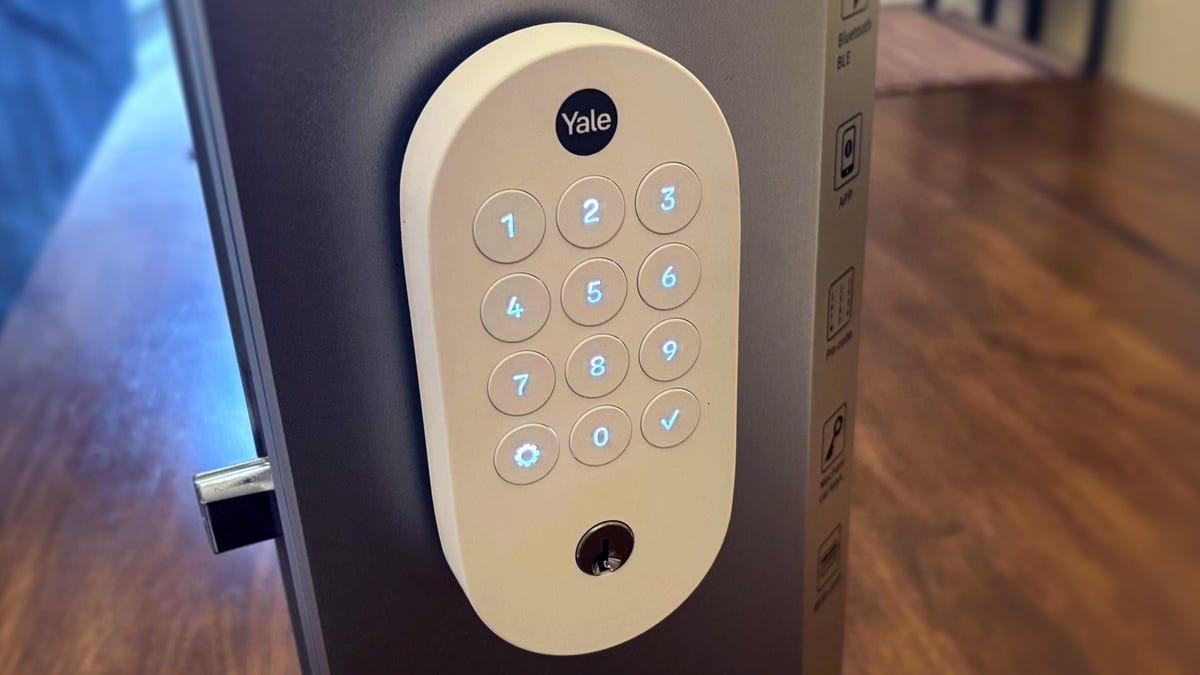
Yale's latest model isn't especially compact -- like a Level Lock -- but it's solid and easy to understand, with a straightforward keypad (using autolit buttons and confirmation chimes) and a traditional keyhole on its front. The lock is rated at BHMA Grade 2, right in the middle of the lock security standard and suitable for basically all residential purposes.
Yale has skipped the bells and whistles, such as fingerprint ID, face recognition or NFC support for this lock, so the outer section is relatively plain compared to more complicated locks.
The inside unit of the lock is only a deadbolt knob and a cover that hides the battery compartment, which takes four AA batteries (included) to operate. The indoor cover is slightly flimsy compared to the rest of the construction, but that won't impact security much, although it risks damage if something smashes into it.
Installation proved smooth for a smart lock
Yale's design makes this smart lock installation easy.
Tyler Lacoma/CNETSmart locks are one of the more complicated home devices to install, but don't let that scare you away from Yale's latest lock. This version is easier to install than most locks I've reviewed. The simple construction is backed by detailed written instructions as well as videos through Yale's website, so you'll get plenty of guidance.
I installed my version with only one Philips screwdriver, and you shouldn't need much more for any standard home door. By skipping the extras some locks include, the Yale lock setup was quick, which is one reason I like this model as a first-time smart home device. It may not be as simple as a retrofit, but it's streamlined compared to many alternatives.
Yale's lock requires four AA batteries.
Tyler Lacoma/CNETBut I'm not a big fan of its extra open/close sensor. This feature requires sticking an additional sensor nub to your doorframe so the lock can tell if the door has remained open. Unfortunately, these separate sensors don't fit on all door trim, are easy to accidentally knock off and add an annoying installation step.
More and more locks can sense open/close status without these add-ons, too. However, this sensor is entirely optional and you can ignore it unless sensing open doors is especially important to you. If you want to get alerts should an older relative leave their door open, I can see where some people would appreciate this feature.
Google Home and Yale's plentiful smart lock features
Wtih Google Home, setting up Yale's lock is stress-free.
Tyler Lacoma/CNETBehind the simple design of Yale's new Matter smart lock are app features that indicate its usefulness and power. Since Yale's lock is Google-forward, I set it up with Google Home, which has major advantages for Google users.
Google Home will recognize the lock with a QR code scan and set it up swiftly -- no need to input your Wi-Fi login unless you've never used Google Home before. While the lock supports other Matter platforms such as Apple Home, I found it will only set up on platform at a time, so I stuck with Google Home, where features are fullest and alerts already pop up on my phone. It also compared well to Yale's own app, which I find lacking in intuitive design.
Autolocking and other important features are included with Yale's lock.
Tyler Lacoma/CNETThe lock/unlock screen is bland, although it does have a vacation mode you can activate to disable the keypad entirely when you're away for long periods of time. Inside the settings, options expand. You can set the timer length of your auto-locking capability, enable one-touch unlocking and locking and adjust what kind of notifications you get, including battery alerts. Don't like the chime sounds? You can lower the volume or turn them off.
Google Home also allows you to give ongoing access to certain people, or create guest passcodes that can be used for a limited time. The current version of Google Home's app is streamlined, speedy and very easy to understand -- a highlight of using the lock. It also means I can switch to other smart devices on Google home or explore integrations with them and Yale's lock. That extends to compatibility with certain Nest products.
Yale's lock has settings to adjust sound, one-touch controls, what notifications you want and plenty more.
Tyler Lacoma/CNET"Hey Google," I said to my Nest Hub Max, "unlock my Yale lock for me." "Please say the code for the Yale Smart Lock," Google Gemini replied (I could also type it into the Nest touchscreen). I like this added feature, since it helps prevent strangers from accessing my lock through the smart home, such as with AI promptware attacks. "What's the status of my Yale lock?" also works if you aren't sure if the door is locked. I came across zero connection difficulties or dropped signals during my testing.
Yale's lock is made to match the Google Nest Doorbell in style, but having a doorbell doesn't add any extra features to the lock, at least not yet. Yale has had specific Google Nest integrations in the past, such as being able to use Nest Familiar Face technology to automatically unlock on recognition with a previous version of the ADT Plus app. Similar features may come to this lock in time.
Final thoughts on the Yale Smart Lock with Matter
I really like the incremental improvements to smart locks shown by the Yale Smart Lock with Matter, including a somewhat easier installation process and straightforward app settings with a focus on the most high-value features. It's also nice to be able to bypass Yale's app entirely and rely on the Google Home app, since I already use that platform frequently.
While the inside cover is slightly flimsy, and I still don't like those door sensor add-ons, this new lock remains impressive and a strong accompaniment to the Nest Doorbell, although I wish those two devices had some integrations to make the pairing more worthwhile -- perhaps in the future.
For now, the latest Google and Yale lock is an excellent starter model for Google fans looking for a more minimal, affordable model. And remember, that Matter support means it can work with Apple Home and Alexa, too, although you may lose a tiny bit of functionality.