Fast & Accurate VIP Embroidery File Conversion for Every Project
Introduction
You have a crisp, clean logo that represents your brand perfectly. You want to stitch it onto uniforms, caps, or bags using your Pfaff embroidery machine. You save the image to a USB, plug it in, and nothing happens. Or worse, the machine starts stitching but the design is distorted and messy. This frustrating experience happens when your machine does not speak the same language as your computer. Regular image files like JPG or PNG contain visual data, but your Pfaff machine needs precise stitch instructions to guide the needle. The process of VIP Embroidery File Conversion is what transforms your artwork into a language your Pfaff machine can actually understand and stitch flawlessly. This guide explains everything you need to know about VIP files and how to get the best results for your projects.
What Is a VIP Embroidery File?
The .VIP format is an embroidery stitch file used by older Pfaff and Husqvarna Viking embroidery machines . It stores vector-based needle coordinates, thread color changes, and density settings required to automate stitching .
The VIP format was introduced after Husqvarna Viking merged with Pfaff in the late 1990s, replacing the earlier .HUS format . While newer machines often use more modern formats like .VP3 or .VP4, the .VIP format remains essential for many older and some newer Pfaff models .
According to the National Archives' PRONOM database, VIP is classified as a "Husqvarna / Pfaff Embroidery Stitch File" and is considered a legacy format that has been superseded by VP3 and VP4 . The file identifies itself with hex values 5BAF9001 or 5DFC9001 in the first four bytes .
Why You Cannot Just Use a Regular Image File
Many people mistakenly believe they can simply rename a JPG or PNG file to .VIP and have it work. This is the single biggest beginner mistake . Image files contain pixel data and colors, but embroidery files contain stitch instructions. When you try to use an image file on your Pfaff machine, it simply cannot interpret it.
A .VIP file contains precise stitch commands: where to place each needle puncture, what type of stitch to use, the direction of each stitch, when to change thread colors, and when to trim thread . These instructions are completely different from the visual data stored in a JPG.
You cannot simply "convert" an image to a VIP file using free online tools. These converters often only change the file extension without creating actual stitch data . What you need is a digitizing process, not a file format conversion.
Professional VIP File Conversion: The Right Way
The Digitizing Process
Turning your logo into a VIP file involves a systematic process that transforms visual artwork into stitch commands. Here are the key steps.
Prepare the logo. Start with a clean, high-resolution image. Vector files like AI, EPS, or SVG are best because they scale without losing quality . Remove unnecessary background elements and resize the logo to match your intended embroidery area.
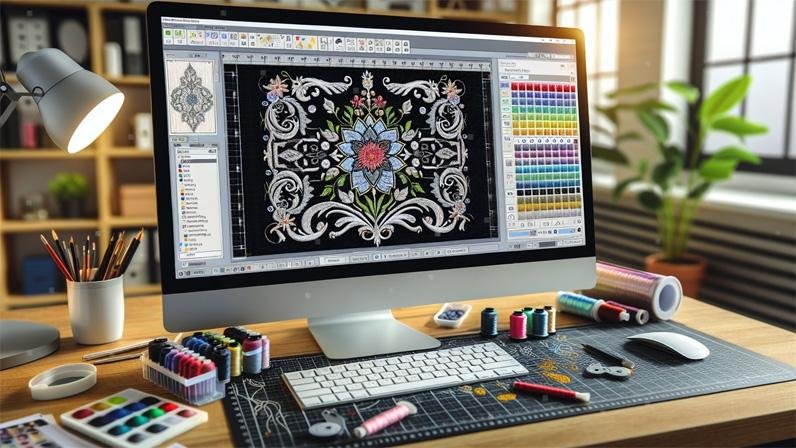
Import into digitizing software. Open your logo in professional embroidery software such as Wilcom Embroidery Studio, Hatch, or Chroma . These programs are designed to convert your design into stitch commands that embroidery machines can read.
Digitize manually. Assign stitch types manually instead of relying on auto-digitizing. Use satin stitches for borders and text, fill stitches for larger areas, and running stitches for fine details . Auto-digitizing often ignores important details and produces inconsistent results .
Adjust stitch settings. Fine-tune stitch density, underlay, and pull compensation. These settings control how the design sits on fabric and prevent puckering or distortion . The right settings depend on your fabric type and design complexity.
Export as a VIP file. Once the design looks perfect, export or save it in the .VIP format, which is compatible with Pfaff and Husqvarna Viking machines .
Test stitch-out. Always run a test stitch on fabric similar to your final product. This verifies stitch quality, color alignment, and design size before mass production .
Why Professional Digitizing Beats Free Converters
Free online VIP converters have serious limitations. They may be able to change a file extension, but they cannot create the actual stitch data your machine needs . The result is often broken threads, uneven stitching, or distorted designs.
Professional digitizing services use skilled digitizers who understand stitch types, density, underlay, and pull compensation. They manually create the stitch paths to ensure your logo looks sharp and sews flawlessly . This level of quality and precision is essential for businesses and anyone who values professional results.
Common Mistakes That Ruin VIP Files
Converting images without proper digitizing. This is the most common mistake. Using free converters that only change the file extension creates a file that looks correct on screen but cannot be stitched properly by your machine .
Relying on auto-digitizing. Auto-digitizing software might seem quick, but it often ignores important details such as fabric type, stitch direction, and density settings. This leads to poor-quality embroidery, uneven textures, and frequent thread breaks .
Incorrect stitch density. Too much density leads to puckering, while too little leaves visible gaps. Always adjust density according to your fabric and design size .
Skipping the test stitch. Never skip the stitch simulation or test run. Testing catches issues before they ruin expensive materials .
Software Options for VIP Conversion
If you want to create VIP files yourself, you need professional digitizing software that supports this format. Wilcom Embroidery Studio is the industry standard for professional digitizing. It offers complete control over stitch types, density, underlay, and sequencing. Hatch is a lighter, more affordable version of Wilcom that still supports VIP output. Chroma is another popular option with a user-friendly interface that exports to VIP format. Embird Studio has modules that can convert between embroidery formats, including VIP to DST or PES conversion .
When to Outsource VIP File Conversion
Professional digitizing services offer the most reliable results for VIP file conversion. Here is why outsourcing is often the better choice.
Expert quality. Professional digitizers have years of experience with different fabrics, machines, and design types. They know exactly how to set density, underlay, and compensation for optimal results.
Time savings. Digitizing is time-consuming, especially for complex designs. Outsourcing frees up your time to focus on production and growing your business.
Production-ready files. Professional services deliver files that run cleanly on the first try, reducing thread breaks and production delays.
Multiple formats. Many businesses need their logo in different formats for different machines. Professional services can provide VIP, VP3, DST, PES, JEF, EXP, and more .
Conclusion
Converting your logo to a VIP embroidery file is not as simple as changing a file extension. It is a detailed process where every stitch must be planned for accuracy, durability, and a professional finish. Without proper digitizing, even the best-designed logo can fail when stitched on fabric.
Whether you choose to digitize yourself using professional software or outsource to experts, the key is understanding what your Pfaff machine needs. VIP files contain stitch instructions, not visual data. The right path to a successful VIP file is manual digitizing with proper stitch selection, density adjustment, and careful testing.
When quality matters, investing in professional VIP file conversion saves time, money, and frustration. Your Pfaff machine is capable of beautiful embroidery when it gets the right instructions. Make sure your file is ready to deliver.
Patrocinado
Patrocinado
Patrocinado
Patrocinado
Anúncios
Categorias
Leia Mais
Xbox Game Pass Adds New Indie Darlings After Price DropIn what feels like a win-win for gamers, Xbox Game Pass has a new lower price and an array of new indie titles coming to the service for the rest of April. Leading the charge is Vampire Crawler, a deck-building game from the team behind 2022's Vampire Survivors.Xbox Game Pass, a CNET Editors' Choice award pick,...

After Zomato, Deepinder Goyal returns with a $54M brain-monitoring bet Weeks after stepping down as CEO from food delivery service Zomato and its parent Eternal, Indian entrepreneur Deepinder Goyal is back with a $54 million raise for wearable startup Temple, part of what the 43-year-old earlier described as a shift toward “higher-risk exploration and experimentation.” On Friday, Goyal said in...

Livestream FA Cup Soccer: Watch Man City vs. Liverpool From AnywhereWhen to watch Man City vs. LiverpoolSaturday at 7:45 a.m. ET (4:45 a.m. PT)Where to watch Man City vs. LiverpoolMan City vs. Liverpool will air in the US on ESPN and ESPN Plus, and is also available via ESPN Select or ESPN Unlimited. Livestream FA Cup Soccer: Watch Man City vs. Liverpool From Anywhere...
Xiaomi May Have Just Invented a Robot Arm for EV ChargingMultiple sites devoted to electric vehicles and charging technology are reporting that Chinese tech company Xiaomi has created a robotic arm for home use that can automatically plug into an electric vehicle for charging.According to a report from CarNewsChina referenced in many of those stories, the product would be released later this...

The three sets of earbuds I reach forI have been an audio reviewer for 20 years. My time as a freelance headphones panelist at Wirecutter, and the multitude of reviews I’ve written for sites like Reviewed, Digital Trends, IGN, and now The Verge, have given me the chance to listen to hundreds of earbuds. Some were truly excellent, and some were pretty hideous. Honestly, they tend to blur...