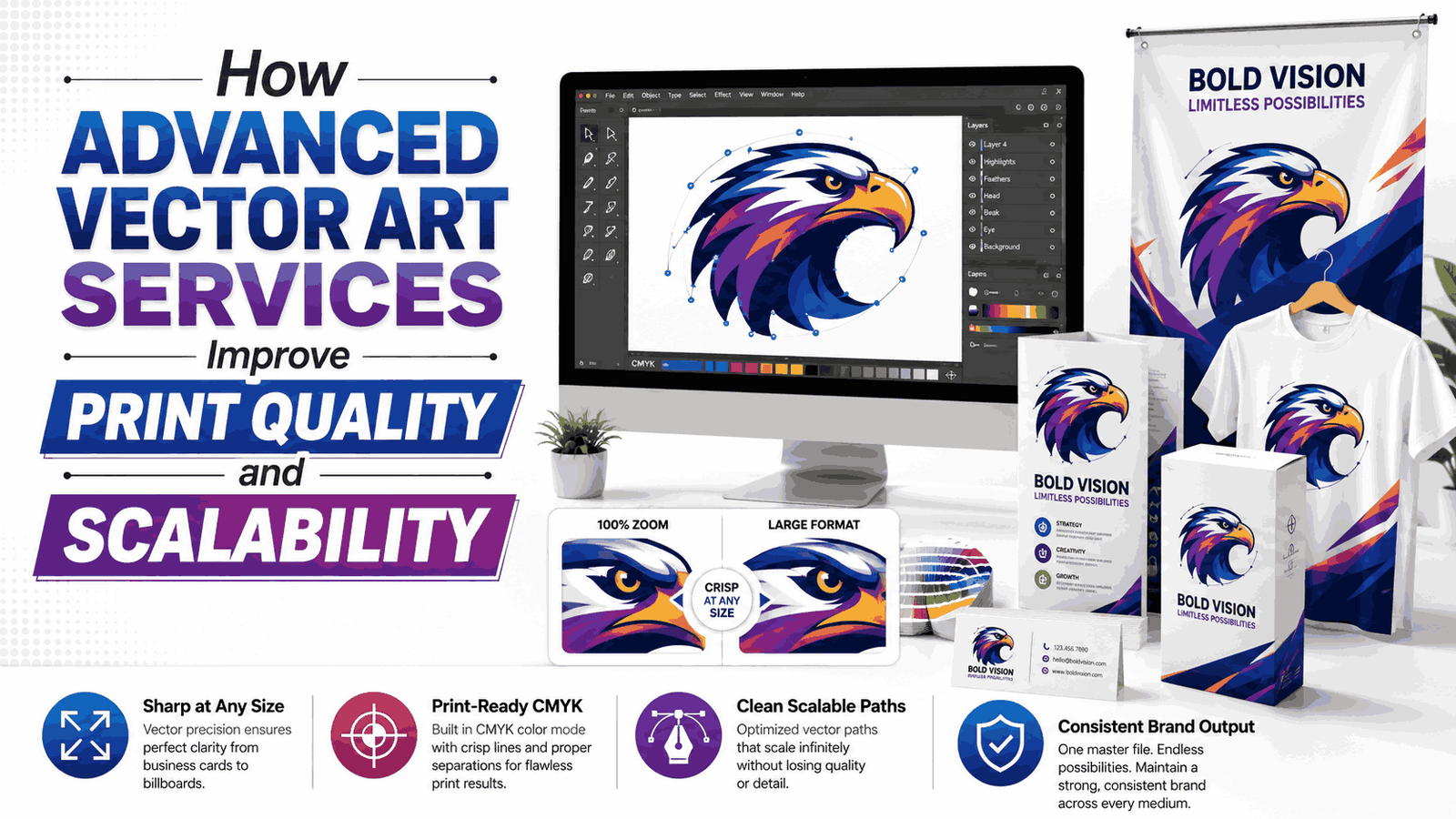
High-quality graphics are essential for modern businesses. Whether you print business cards, banners, vehicle wraps, promotional products, uniforms, or product packaging, the quality of your artwork directly affects the final result. Many companies still rely on low-resolution images downloaded from websites or received from customers. While these images may appear acceptable on a computer screen, they often become blurry or pixelated when enlarged for professional printing. This is where Advanced Vector Art Services become an important part of the printing process. They convert raster images into clean, scalable vector files that maintain sharp edges and consistent quality at any size.
Businesses, print shops, apparel decorators, sign makers, and marketing agencies depend on vector artwork because it provides flexibility across multiple printing methods. Instead of recreating artwork for every project, a professionally prepared vector file can be resized, edited, and printed repeatedly without sacrificing quality. This saves time, reduces production errors, and delivers consistent branding across every product.
What Are Advanced Vector Art Services?
Advanced vector art services involve converting logos, illustrations, sketches, and low-resolution images into mathematically generated vector graphics. Unlike raster images that consist of pixels, vector graphics use paths, anchor points, and curves to create artwork.
Because vectors rely on mathematical calculations rather than pixels, they remain perfectly sharp regardless of size. Whether the design is printed on a pen or a large billboard, the artwork retains its clarity.
Professional vector artists manually redraw every element instead of relying on automatic conversion software. This approach produces cleaner lines, balanced curves, accurate proportions, and better color separation.
Understanding the Difference Between Raster and Vector Graphics
Many people assume all digital images work the same way, but raster and vector graphics serve different purposes.
Raster images include:
These files are made up of thousands or millions of pixels. When enlarged beyond their original size, the pixels become visible, causing blurry edges and poor print quality.
Vector files include:
- AI
- EPS
- SVG
- PDF (Vector)
- CDR
These formats can be enlarged almost infinitely without losing detail, making them the preferred choice for professional printing.
Why Print Quality Depends on Vector Artwork
Printing equipment reproduces every detail contained in the artwork. If the source image contains rough edges, compression artifacts, or blurry text, those imperfections appear in the printed product.
Advanced vector artwork eliminates these problems by providing:
- Smooth curves
- Crisp outlines
- Precise lettering
- Clean geometric shapes
- Accurate spacing
This creates professional-looking printed materials across different sizes and printing methods.
Scalability Without Losing Image Quality
One of the greatest benefits of vector graphics is unlimited scalability.
A business logo may be used on:
- Business cards
- Company uniforms
- Website headers
- Vehicle graphics
- Storefront signage
- Trade show displays
- Billboards
Using separate image files for each size creates inconsistencies. A single vector file can be resized for every application while maintaining identical quality.
This flexibility saves businesses significant time over the long term.
Sharper Logos for Professional Branding
Logos represent a company's identity. A blurry logo creates an unprofessional impression regardless of the quality of the printed product.
Advanced vector artwork ensures:
- Clean corners
- Uniform line thickness
- Perfect circles
- Balanced proportions
- Readable small text
Professional branding depends heavily on this level of precision.
Improved Color Accuracy
Professional printing often uses spot colors, Pantone colors, or CMYK color systems.
Vector artwork allows designers to assign exact color values, resulting in:
- Consistent brand colors
- Better color matching
- Cleaner color separations
- Improved screen printing results
This consistency becomes especially important for companies printing thousands of promotional products.
Better Results for Large-Format Printing
Large-format printing magnifies every flaw in an image.
Products that require large graphics include:
- Outdoor banners
- Wall graphics
- Window decals
- Vehicle wraps
- Building signage
- Exhibition displays
Raster images frequently become pixelated at these sizes.
Professionally prepared vector graphics remain sharp from a few inches to several meters wide.
Cleaner Screen Printing
Screen printing requires artwork with solid shapes and well-defined edges.
Poor artwork may cause:
- Jagged outlines
- Uneven ink deposits
- Registration issues
- Difficult color separation
Vector files simplify production by creating precise paths that printers can separate into individual color layers.
The result is cleaner, sharper prints with better consistency.
Improved Vinyl Cutting Accuracy
Vinyl cutting machines follow vector paths directly.
If artwork contains rough edges or broken paths, the cutter may produce inaccurate results.
Advanced vector artwork provides:
- Continuous cutting paths
- Smooth curves
- Accurate corners
- Proper spacing
This reduces material waste and improves production efficiency.
Supports Multiple Printing Methods
One professionally prepared vector file works across many printing techniques, including:
- Screen printing
- Heat transfer
- Sublimation
- Direct-to-film (DTF)
- UV printing
- Offset printing
- Digital printing
- Vinyl cutting
- Laser engraving
Businesses can use the same artwork without creating separate files for each production process.
Easy Future Editing
Businesses frequently update logos, marketing materials, and promotional products.
Vector files make editing simple because designers can easily modify:
- Colors
- Text
- Shapes
- Sizes
- Layouts
Raster images often require complete recreation when significant edits are needed.
Higher Production Efficiency
Professional vector artwork speeds up production because print operators spend less time correcting customer files.
Benefits include:
- Faster setup
- Fewer production delays
- Lower correction costs
- Better workflow
- Reduced printing errors
This improves overall business productivity.
Supports Consistent Brand Identity
Modern businesses use the same logo across websites, social media, uniforms, packaging, vehicles, catalogs, and promotional products.
Vector artwork helps maintain consistent branding by ensuring every version of the logo remains identical regardless of where it is used.
Consistency strengthens customer recognition and builds trust.
Ideal for Promotional Products
Promotional products are produced in many sizes and materials.
Examples include:
- Pens
- Mugs
- Water bottles
- Keychains
- Caps
- T-shirts
- Tote bags
- Notebooks
Vector artwork adapts easily to these different products while maintaining professional quality.
Common Industries That Benefit
Many industries rely on advanced vector artwork for daily production, including:
- Apparel manufacturers
- Embroidery businesses
- Print shops
- Advertising agencies
- Packaging companies
- Promotional product suppliers
- Sign manufacturers
- Marketing firms
- Corporate branding teams
These industries require artwork that remains accurate throughout high-volume production.
Why Manual Vector Conversion Produces Better Results
Automatic vector conversion software often creates:
- Excess anchor points
- Uneven curves
- Distorted lettering
- Rough outlines
- Broken shapes
Professional artists manually redraw every element for improved accuracy.
Manual conversion produces:
- Smoother curves
- Better symmetry
- Cleaner typography
- Accurate proportions
- Smaller file sizes
This results in artwork that is easier to edit and more suitable for commercial printing.
Choosing a Professional Vector Art Service
When selecting a provider, consider:
- Experience with commercial printing
- Manual vector conversion instead of automated tracing
- Fast turnaround times
- Multiple editable file formats
- Revision support
- Quality control procedures
- Clear communication
Review previous work to ensure the provider consistently produces clean, professional artwork.
Conclusion
Professional printing begins with professional artwork. Advanced Vector Art Services help businesses produce sharper graphics, maintain consistent branding, reduce production errors, and support printing across many different products and sizes. Whether you are creating business cards, apparel, signage, packaging, promotional products, or marketing materials, professionally prepared vector artwork provides the flexibility and quality needed for reliable results. Choosing experienced professionals ensures your artwork remains accurate, scalable, and ready for future projects. For businesses seeking dependable vector conversion and printing support, Idigitize offers solutions designed to meet commercial production standards.
Frequently Asked Questions
Q1: What are advanced vector art services?
They involve manually converting raster images into scalable vector graphics suitable for professional printing.
Q2: Why are vector files better for printing?
Vector files remain sharp at any size, unlike raster images that become blurry when enlarged.
Q3: Which file formats are commonly used for vector artwork?
Common formats include AI, EPS, SVG, PDF (Vector), and CDR.
Q4: Can vector artwork be used for embroidery?
Yes. Vector artwork is often used as the starting point for creating embroidery digitizing files because it provides clean outlines and accurate shapes.
Q5: Is manual vector conversion better than automatic tracing?
Yes. Manual conversion produces cleaner lines, smoother curves, accurate text, and better overall print quality than automated software.